Agent Avatar Status New
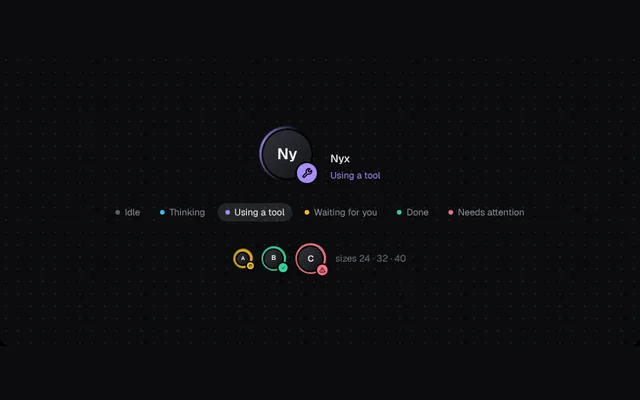
An agent avatar with a ring that spins, breathes or settles for idle, thinking, tool use, waiting, done and error.
Installation
01
Install with the shadcn CLI. The NiceUI theme comes along the first time.
$ npx shadcn@latest add https://niceui.dev/r/ai-agent-status-ring.json02
Or copy the source below. Dependencies: lucide-react.
Source
components/niceui/ai/thinking/AgentStatusRing.tsx
import { useEffect, useState } from 'react';
import { AlertTriangle, Check, Hand, Sparkles, Wrench } from 'lucide-react';
import { cn } from '@/lib/cn';

export type AgentState = 'idle' | 'thinking' | 'tool' | 'waiting' | 'done' | 'error';

const META: Record<AgentState, { label: string; color: string; ring: string; icon?: typeof Check }> = {
  idle: { label: 'Idle', color: '#5b6068', ring: 'rgba(91,96,104,.5)' },
  thinking: { label: 'Thinking', color: '#38bdf8', ring: 'rgba(56,189,248,.9)', icon: Sparkles },
  tool: { label: 'Using a tool', color: '#a78bfa', ring: 'rgba(167,139,250,.9)', icon: Wrench },
  waiting: { label: 'Waiting for you', color: '#fbbf24', ring: 'rgba(251,191,36,.9)', icon: Hand },
  done: { label: 'Done', color: '#34d399', ring: 'rgba(52,211,153,.9)', icon: Check },
  error: { label: 'Needs attention', color: '#fb7185', ring: 'rgba(251,113,133,.9)', icon: AlertTriangle },
};

const css = `
@keyframes th-ring-spin { to { transform: rotate(360deg) } }
@keyframes th-ring-breathe { 0%, 100% { opacity: .45; transform: scale(1) } 50% { opacity: 1; transform: scale(1.06) } }
@media (prefers-reduced-motion: reduce) { .th-ring * { animation: none !important } }
`;

export type AgentStatusRingProps = {
  state: AgentState;
  initials?: string;
  size?: number;
  className?: string;
};

/** An agent avatar wrapped in a ring that spins, breathes or settles to show what the agent is doing. */
export function AgentStatusRing({ state, initials = 'AI', size = 56, className }: AgentStatusRingProps) {
  const m = META[state];
  const Icon = m.icon;
  const spinning = state === 'thinking' || state === 'tool';
  return (
    <span role="img" aria-label={`Agent: ${m.label}`} className={cn('th-ring relative inline-grid shrink-0 place-items-center', className)} style={{ width: size, height: size }}>
      <style>{css}</style>
      <span
        aria-hidden
        className="absolute inset-0 rounded-full transition-[background] duration-500"
        style={{
          background: spinning
            ? `conic-gradient(from 0deg, transparent 0deg, ${m.ring} 110deg, transparent 200deg)`
            : `conic-gradient(${m.ring}, ${m.ring})`,
          animation: spinning ? `th-ring-spin ${state === 'tool' ? 0.9 : 1.4}s linear infinite` : state === 'waiting' ? 'th-ring-breathe 1.6s ease-in-out infinite' : 'none',
          opacity: state === 'idle' ? 0.6 : 1,
        }}
      />
      <span aria-hidden className="absolute rounded-full bg-ink-950" style={{ inset: 2.5 }} />
      <span
        aria-hidden
        className="relative grid place-items-center rounded-full bg-gradient-to-br from-ink-700 to-ink-850 font-semibold text-ink-50"
        style={{ width: size - 9, height: size - 9, fontSize: size * 0.28 }}
      >
        {initials}
      </span>
      {Icon && (
        <span
          key={state}
          aria-hidden
          className="absolute -bottom-0.5 -right-0.5 grid place-items-center rounded-full text-ink-950 ring-2 ring-ink-950 animate-scale-in"
          style={{ width: size * 0.36, height: size * 0.36, background: m.color }}
        >
          <Icon style={{ width: size * 0.2, height: size * 0.2 }} strokeWidth={2.5} />
        </span>
      )}
    </span>
  );
}

const ORDER: AgentState[] = ['idle', 'thinking', 'tool', 'waiting', 'done', 'error'];

export function AgentStatusRingDemo() {
  const [state, setState] = useState<AgentState>('thinking');
  const [auto, setAuto] = useState(true);
  useEffect(() => {
    if (!auto || window.matchMedia('(prefers-reduced-motion: reduce)').matches) return;
    const id = window.setInterval(() => setState((s) => ORDER[(ORDER.indexOf(s) + 1) % ORDER.length]), 2200);
    return () => clearInterval(id);
  }, [auto]);
  return (
    <div className="flex w-full flex-col items-center gap-7">
      <div className="flex items-end gap-5">
        <AgentStatusRing state={state} size={72} initials="Ny" />
        <div className="flex flex-col gap-1">
          <span className="text-sm font-medium text-ink-50">Nyx</span>
          <span key={state} className="text-xs animate-fade-in" style={{ color: META[state].color }}>
            {META[state].label}
          </span>
        </div>
      </div>
      <div className="flex flex-wrap justify-center gap-1.5" role="group" aria-label="Agent state">
        {ORDER.map((s) => (
          <button
            key={s}
            onClick={() => {
              setAuto(false);
              setState(s);
            }}
            aria-pressed={state === s}
            className={cn(
              'focus-ring flex items-center gap-1.5 rounded-full px-2.5 py-1 text-xs transition-colors',
              state === s ? 'bg-white/10 text-ink-50' : 'text-ink-400 hover:bg-white/5 hover:text-ink-200',
            )}
          >
            <span className="h-1.5 w-1.5 rounded-full" style={{ background: META[s].color }} />
            {META[s].label}
          </button>
        ))}
      </div>
      <div className="flex items-center gap-3">
        {[24, 32, 40].map((s, i) => (
          <AgentStatusRing key={s} size={s} state={ORDER[(ORDER.indexOf(state) + i + 1) % ORDER.length]} initials={['A', 'B', 'C'][i]} />
        ))}
        <span className="text-xs text-ink-500">sizes 24 · 32 · 40</span>
      </div>
    </div>
  );
}