AI Command Palette New
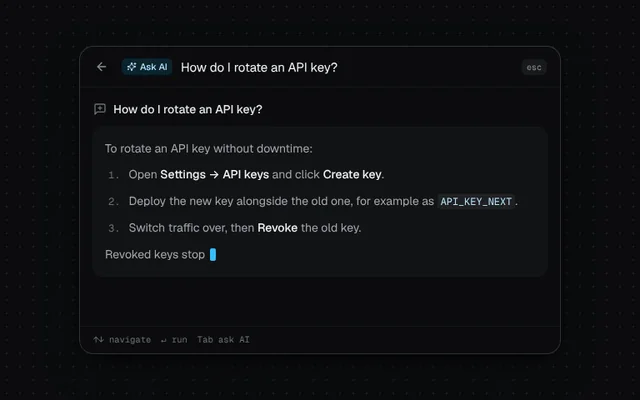
A ⌘K palette that runs commands and turns any question into a streamed AI answer with insert and copy actions.
Installation
01
Install with the shadcn CLI. The NiceUI theme comes along the first time.
$ npx shadcn@latest add https://niceui.dev/r/ai-ai-command-palette.json02
Or copy the source below (2 files). Dependencies: lucide-react.
Source
components/niceui/ai/AICommandPalette.tsx
import { useEffect, useMemo, useRef, useState, type KeyboardEvent } from 'react';
import { ArrowLeft, Check, Copy, CornerDownLeft, CreditCard, FilePlus2, History, MessageSquarePlus, Moon, Search, Settings, Sparkles, Users } from 'lucide-react';
import { cn } from '@/lib/cn';
import { Markdown } from './stream';

const reduced = () => typeof window !== 'undefined' && window.matchMedia('(prefers-reduced-motion: reduce)').matches;

export type PaletteCommand = { id: string; label: string; group: string; icon: typeof Search; shortcut?: string };

const COMMANDS: PaletteCommand[] = [
  { id: 'new', label: 'New document', group: 'Suggestions', icon: FilePlus2, shortcut: 'N' },
  { id: 'recent', label: 'Open recent…', group: 'Suggestions', icon: History },
  { id: 'theme', label: 'Toggle dark mode', group: 'Suggestions', icon: Moon, shortcut: 'D' },
  { id: 'settings', label: 'Go to Settings', group: 'Navigation', icon: Settings, shortcut: ',' },
  { id: 'billing', label: 'Go to Billing', group: 'Navigation', icon: CreditCard },
  { id: 'team', label: 'Invite teammates', group: 'Navigation', icon: Users },
];

const ANSWER = `To rotate an API key without downtime:
1. Open **Settings → API keys** and click **Create key**.
2. Deploy the new key alongside the old one, for example as \`API_KEY_NEXT\`.
3. Switch traffic over, then **Revoke** the old key.
Revoked keys stop working within 60 seconds.`;

export type AICommandPaletteProps = {
  commands?: PaletteCommand[];
  /** Streams the answer for a question; the demo uses a canned reply. */
  answerFor?: (question: string) => string;
  /** Types this question on mount to show the AI mode. */
  demoQuestion?: string;
  className?: string;
};

/** A ⌘K palette that runs commands and turns any question into an inline AI answer. */
export function AICommandPalette({ commands = COMMANDS, answerFor = () => ANSWER, demoQuestion, className }: AICommandPaletteProps) {
  const [query, setQuery] = useState('');
  const [mode, setMode] = useState<'commands' | 'ai'>('commands');
  const [active, setActive] = useState(0);
  const [asked, setAsked] = useState('');
  const [n, setN] = useState(0);
  const [toast, setToast] = useState('');
  const [done, setDone] = useState<'insert' | 'copy' | null>(null);
  const input = useRef<HTMLInputElement>(null);
  const touched = useRef(false);
  const timers = useRef<number[]>([]);

  const answer = useMemo(() => (asked ? answerFor(asked) : ''), [asked, answerFor]);
  const tokens = useMemo(() => answer.split(/(\s+)/).filter(Boolean), [answer]);
  const streaming = mode === 'ai' && n < tokens.length;

  const filtered = commands.filter((c) => c.label.toLowerCase().includes(query.toLowerCase()));
  const items = query.trim() ? [{ id: 'ask', label: `Ask AI: “${query.trim()}”`, group: 'AI', icon: Sparkles } as PaletteCommand, ...filtered] : filtered;

  useEffect(() => () => timers.current.forEach(clearTimeout), []);
  useEffect(() => setActive(0), [query]);

  useEffect(() => {
    if (mode !== 'ai' || n >= tokens.length) return;
    const id = window.setTimeout(() => setN((c) => c + 2), 24 + Math.random() * 26);
    return () => clearTimeout(id);
  }, [mode, n, tokens.length]);

  const askAI = (q: string) => {
    if (!q.trim()) return;
    setAsked(q.trim());
    setMode('ai');
    setDone(null);
    setN(reduced() ? Infinity : 0);
  };

  // Demo: type a question, then hand it to the AI.
  useEffect(() => {
    if (!demoQuestion) return;
    if (reduced()) {
      setQuery(demoQuestion);
      askAI(demoQuestion);
      return;
    }
    [...demoQuestion].forEach((_, i) => timers.current.push(window.setTimeout(() => !touched.current && setQuery(demoQuestion.slice(0, i + 1)), 500 + i * 32)));
    timers.current.push(window.setTimeout(() => !touched.current && askAI(demoQuestion), 500 + demoQuestion.length * 32 + 350));
    // eslint-disable-next-line react-hooks/exhaustive-deps
  }, [demoQuestion]);

  const run = (c: PaletteCommand) => {
    if (c.id === 'ask') return askAI(query);
    setToast(c.label);
    timers.current.push(window.setTimeout(() => setToast(''), 1600));
  };

  const onKey = (e: KeyboardEvent<HTMLInputElement>) => {
    touched.current = true;
    if (mode === 'ai') {
      if (e.key === 'Escape') {
        e.preventDefault();
        setMode('commands');
      }
      if (e.key === 'Enter' && query.trim() && query.trim() !== asked) askAI(query);
      return;
    }
    if (e.key === 'ArrowDown') {
      e.preventDefault();
      setActive((a) => (items.length ? (a + 1) % items.length : 0));
    } else if (e.key === 'ArrowUp') {
      e.preventDefault();
      setActive((a) => (items.length ? (a - 1 + items.length) % items.length : 0));
    } else if (e.key === 'Enter' && items[active]) {
      e.preventDefault();
      run(items[active]);
    } else if (e.key === 'Tab' && query.trim()) {
      e.preventDefault();
      askAI(query);
    } else if (e.key === 'Escape') setQuery('');
  };

  const act = (k: 'insert' | 'copy') => {
    if (k === 'copy') navigator.clipboard?.writeText(answer).catch(() => {});
    setDone(k);
    timers.current.push(window.setTimeout(() => setDone(null), 1400));
  };

  const groups = [...new Set(items.map((i) => i.group))];

  return (
    <div className={cn('relative w-full overflow-hidden rounded-2xl bg-ink-900 shadow-pop ring-1 ring-white/10', className)} onPointerDown={() => (touched.current = true)}>
      <div className="flex items-center gap-2.5 border-b border-white/5 px-4">
        {mode === 'ai' ? (
          <button onClick={() => setMode('commands')} aria-label="Back to commands" className="focus-ring -ml-1 grid h-7 w-7 place-items-center rounded-md text-ink-400 hover:bg-white/5 hover:text-ink-100">
            <ArrowLeft className="h-4 w-4" />
          </button>
        ) : (
          <Search className="h-4 w-4 shrink-0 text-ink-500" />
        )}
        {mode === 'ai' && <span className="flex shrink-0 items-center gap-1 rounded-md bg-brand-500/15 px-1.5 py-0.5 text-[11px] font-medium text-brand-200"><Sparkles className="h-3 w-3" /> Ask AI</span>}
        <input
          ref={input}
          value={query}
          onChange={(e) => {
            touched.current = true;
            setQuery(e.target.value);
          }}
          onKeyDown={onKey}
          placeholder={mode === 'ai' ? 'Ask a follow-up…' : 'Search commands or ask a question…'}
          aria-label="Command or question"
          role="combobox"
          aria-expanded={mode === 'commands'}
          aria-controls="ai-palette-list"
          className="h-12 min-w-0 flex-1 bg-transparent text-[15px] text-ink-50 outline-none placeholder:text-ink-500"
        />
        <kbd className="hidden rounded-md bg-white/[0.06] px-1.5 py-0.5 font-mono text-[10px] text-ink-400 sm:block">esc</kbd>
      </div>

      {mode === 'commands' ? (
        <div id="ai-palette-list" role="listbox" className="max-h-72 overflow-y-auto p-2 [scrollbar-width:none]">
          {groups.map((g) => (
            <div key={g} className="pb-1">
              <p className="px-2 pb-1 pt-2 text-[11px] font-medium text-ink-500">{g}</p>
              {items.map((c, i) =>
                c.group !== g ? null : (
                  <button
                    key={c.id}
                    role="option"
                    aria-selected={i === active}
                    onMouseMove={() => setActive(i)}
                    onClick={() => run(c)}
                    className={cn('flex w-full min-w-0 items-center gap-3 rounded-lg px-2.5 py-2 text-left text-sm transition-colors', i === active ? 'bg-white/[0.06] text-ink-50' : 'text-ink-300')}
                  >
                    <c.icon className={cn('h-4 w-4 shrink-0', c.id === 'ask' ? 'text-brand-400' : 'text-ink-500')} />
                    <span className={cn('min-w-0 flex-1 truncate', c.id === 'ask' && 'text-brand-100')}>{c.label}</span>
                    {c.id === 'ask' ? <kbd className="rounded bg-white/[0.06] px-1.5 font-mono text-[10px] text-ink-400">Tab</kbd> : c.shortcut && <kbd className="rounded bg-white/[0.06] px-1.5 font-mono text-[10px] text-ink-500">⌘{c.shortcut}</kbd>}
                  </button>
                ),
              )}
            </div>
          ))}
          {!items.length && <p className="px-3 py-8 text-center text-sm text-ink-500">No commands. Type a question to ask AI.</p>}
        </div>
      ) : (
        <div className="p-4">
          <p className="mb-3 flex items-start gap-2 text-sm font-medium text-ink-100">
            <MessageSquarePlus className="mt-0.5 h-4 w-4 shrink-0 text-ink-500" />
            {asked}
          </p>
          <div className="min-h-[120px] rounded-xl bg-white/[0.03] p-3.5 ring-1 ring-white/5">
            <Markdown text={tokens.slice(0, n).join('')} caret={streaming} />
          </div>
          <div className={cn('mt-3 flex flex-wrap items-center gap-2 transition-opacity duration-300', streaming ? 'pointer-events-none opacity-0' : 'opacity-100')}>
            <button onClick={() => act('insert')} className="focus-ring flex h-8 items-center gap-1.5 rounded-lg bg-ink-50 px-3 text-xs font-medium text-ink-950 transition-colors hover:bg-white">
              {done === 'insert' ? <Check className="h-3.5 w-3.5" /> : <CornerDownLeft className="h-3.5 w-3.5" />} {done === 'insert' ? 'Inserted' : 'Insert'}
            </button>
            <button onClick={() => act('copy')} className="focus-ring flex h-8 items-center gap-1.5 rounded-lg px-3 text-xs text-ink-300 ring-1 ring-white/10 transition-colors hover:text-ink-50">
              {done === 'copy' ? <Check className="h-3.5 w-3.5 text-emerald-400" /> : <Copy className="h-3.5 w-3.5" />} {done === 'copy' ? 'Copied' : 'Copy'}
            </button>
            <button
              onClick={() => {
                setQuery('');
                input.current?.focus();
              }}
              className="focus-ring flex h-8 items-center gap-1.5 rounded-lg px-3 text-xs text-ink-300 ring-1 ring-white/10 transition-colors hover:text-ink-50"
            >
              <Sparkles className="h-3.5 w-3.5 text-brand-400" /> Ask more
            </button>
          </div>
        </div>
      )}

      <div className="flex items-center gap-3 border-t border-white/5 px-4 py-2 font-mono text-[10.5px] text-ink-500">
        <span>↑↓ navigate</span>
        <span>↵ run</span>
        <span className="hidden sm:inline">Tab ask AI</span>
        {toast && <span className="ml-auto flex items-center gap-1 text-emerald-400 animate-fade-in"><Check className="h-3 w-3" /> {toast}</span>}
      </div>
    </div>
  );
}

export function AICommandPaletteDemo() {
  return (
    <div className="mx-auto w-full max-w-xl">
      <AICommandPalette demoQuestion="How do I rotate an API key?" />
    </div>
  );
}
components/niceui/ai/stream.tsx
import { Fragment, useCallback, useEffect, useRef, useState, type ReactNode } from 'react';
import { cn } from '@/lib/cn';

/** Streams `text` token-by-token (words + whitespace). */
export function useStream(text: string, { speed = 32, enabled = true }: { speed?: number; enabled?: boolean } = {}) {
  const [count, setCount] = useState(0);
  const [run, setRun] = useState(0);
  const tokens = useRef<string[]>([]);
  tokens.current = text.split(/(\s+)/).filter(Boolean);

  useEffect(() => {
    setCount(0);
  }, [text, run]);

  useEffect(() => {
    if (!enabled) return;
    if (count >= tokens.current.length) return;
    const jitter = speed * (0.5 + Math.random());
    const t = window.setTimeout(() => setCount((c) => c + 2), jitter);
    return () => window.clearTimeout(t);
  }, [count, enabled, speed, text, run]);

  const restart = useCallback(() => setRun((r) => r + 1), []);
  const total = tokens.current.length;
  return { output: tokens.current.slice(0, count).join(''), done: count >= total, restart, progress: total ? Math.min(1, count / total) : 1 };
}

export function Caret({ className }: { className?: string }) {
  return <span aria-hidden className={cn('ml-0.5 inline-block h-[1.05em] w-[7px] translate-y-[3px] animate-blink rounded-[2px] bg-brand-400', className)} />;
}

function inline(text: string) {
  return text.split(/(\*\*[^*]+\*\*|`[^`]+`)/g).map((part, i) => {
    if (part.startsWith('**') && part.endsWith('**') && part.length > 4)
      return <strong key={i} className="font-medium text-ink-50">{part.slice(2, -2)}</strong>;
    if (part.startsWith('`') && part.endsWith('`') && part.length > 2)
      return <code key={i} className="rounded bg-white/[0.06] px-1 py-px font-mono text-[0.85em] text-brand-200">{part.slice(1, -1)}</code>;
    return <Fragment key={i}>{part}</Fragment>;
  });
}

/** Minimal markdown: `## heading`, `- bullet`, `1. step`, **bold**, `code`. */
export function Markdown({ text, caret, className }: { text: string; caret?: boolean; className?: string }) {
  const blocks = text.split('\n').filter((l, i, arr) => l.trim() !== '' || i === arr.length - 1);
  const last = blocks.length - 1;
  const tail = (i: number): ReactNode => (caret && i === last ? <Caret /> : null);

  return (
    <div className={cn('space-y-2 text-sm leading-relaxed text-ink-300', className)}>
      {blocks.map((line, i) => {
        if (line.startsWith('## '))
          return (
            <h4 key={i} className="pt-1 text-[15px] font-medium text-ink-50">
              {inline(line.slice(3))}
              {tail(i)}
            </h4>
          );
        const bullet = line.match(/^(- |\d+\. )(.*)$/);
        if (bullet)
          return (
            <div key={i} className="flex gap-2.5 pl-1">
              <span className={cn('shrink-0 select-none', bullet[1] === '- ' ? 'mt-[9px] h-1 w-1 rounded-full bg-brand-400' : 'font-mono text-xs leading-6 text-ink-500')}>
                {bullet[1] === '- ' ? '' : bullet[1].trim()}
              </span>
              <p>
                {inline(bullet[2])}
                {tail(i)}
              </p>
            </div>
          );
        return (
          <p key={i}>
            {inline(line)}
            {tail(i)}
          </p>
        );
      })}
    </div>
  );
}