Rate Limit New
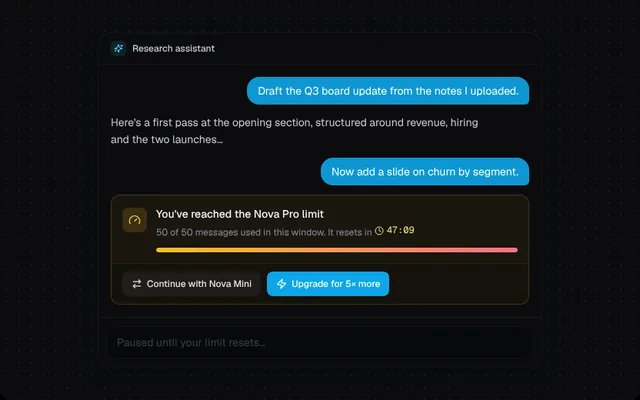
A usage-limit notice with a live reset countdown, a usage meter, and options to switch model or upgrade.
Installation
01
Install with the shadcn CLI. The NiceUI theme comes along the first time.
$ npx shadcn@latest add https://niceui.dev/r/ai-rate-limit-notice.json02
Or copy the source below (2 files). Dependencies: lucide-react.
Source
components/niceui/ai/errors/RateLimitNotice.tsx
import { useState } from 'react';
import { ArrowRightLeft, Check, Clock, Gauge, Zap } from 'lucide-react';
import { cn } from '@/lib/cn';
import { AssistantMsg, Composer, Thread, UserMsg, fmtClock, useCountdown } from './shared';

export type RateLimitNoticeProps = {
  used: number;
  limit: number;
  /** When the window resets, as a timestamp in ms. */
  resetAt: number;
  model: string;
  fallbackModel?: string;
  onSwitchModel?: () => void;
  onUpgrade?: () => void;
  className?: string;
};

export function RateLimitNotice({ used, limit, resetAt, model, fallbackModel, onSwitchModel, onUpgrade, className }: RateLimitNoticeProps) {
  const left = useCountdown(resetAt);
  const pct = Math.min(100, (used / limit) * 100);
  const hours = Math.floor(left / 3600);
  const clock = hours ? `${hours}h ${fmtClock(left % 3600)}` : fmtClock(left);

  return (
    <div role="status" className={cn('overflow-hidden rounded-xl border border-amber-400/20 bg-amber-400/[0.06]', className)}>
      <div className="flex items-start gap-3 p-3.5">
        <span className="mt-0.5 flex h-8 w-8 shrink-0 items-center justify-center rounded-lg bg-amber-400/15 text-amber-300">
          <Gauge className="h-4 w-4" />
        </span>
        <div className="min-w-0 flex-1">
          <p className="text-sm font-medium text-ink-50">You've reached the {model} limit</p>
          <p className="mt-0.5 text-xs leading-relaxed text-ink-400">
            {used} of {limit} messages used in this window. It resets in{' '}
            <span className="inline-flex items-center gap-1 font-mono tabular-nums text-amber-200">
              <Clock className="h-3 w-3" />
              {clock}
            </span>
          </p>
          <div className="mt-2.5 h-1.5 overflow-hidden rounded-full bg-white/5">
            <div className="h-full rounded-full bg-gradient-to-r from-amber-400 to-rose-400 transition-[width] duration-700 ease-smooth" style={{ width: `${pct}%` }} />
          </div>
        </div>
      </div>
      <div className="flex flex-wrap gap-2 border-t border-amber-400/10 bg-black/20 px-3.5 py-2.5">
        {fallbackModel && (
          <button onClick={onSwitchModel} className="focus-ring inline-flex h-8 items-center gap-1.5 rounded-lg bg-white/5 px-3 text-xs font-medium text-ink-100 transition-colors hover:bg-white/10">
            <ArrowRightLeft className="h-3.5 w-3.5" /> Continue with {fallbackModel}
          </button>
        )}
        <button onClick={onUpgrade} className="focus-ring inline-flex h-8 items-center gap-1.5 rounded-lg bg-brand-500 px-3 text-xs font-medium text-white transition-colors hover:bg-brand-400">
          <Zap className="h-3.5 w-3.5" /> Upgrade for 5× more
        </button>
      </div>
    </div>
  );
}

export function RateLimitNoticeDemo() {
  const [resetAt] = useState(() => Date.now() + (47 * 60 + 12) * 1000);
  const [mode, setMode] = useState<'limited' | 'switched' | 'upgraded'>('limited');

  return (
    <Thread footer={<Composer disabled={mode === 'limited'} placeholder={mode === 'limited' ? 'Paused until your limit resets…' : 'Ask anything…'} />}>
      <UserMsg>Draft the Q3 board update from the notes I uploaded.</UserMsg>
      <AssistantMsg>Here's a first pass at the opening section, structured around revenue, hiring and the two launches…</AssistantMsg>
      <UserMsg>Now add a slide on churn by segment.</UserMsg>
      {mode === 'limited' ? (
        <RateLimitNotice used={50} limit={50} resetAt={resetAt} model="Nova Pro" fallbackModel="Nova Mini" onSwitchModel={() => setMode('switched')} onUpgrade={() => setMode('upgraded')} />
      ) : (
        <div className="flex items-center gap-2 rounded-xl bg-emerald-400/[0.07] px-3.5 py-2.5 text-xs text-emerald-200 animate-fade-up">
          <Check className="h-3.5 w-3.5" />
          {mode === 'switched' ? 'Switched to Nova Mini for this chat. Your message was sent again.' : 'Upgraded to Pro. Limits raised and your message was sent again.'}
          <button onClick={() => setMode('limited')} className="focus-ring ml-auto rounded-md px-2 py-0.5 text-ink-400 hover:text-ink-100">
            Reset demo
          </button>
        </div>
      )}
    </Thread>
  );
}
components/niceui/ai/errors/shared.tsx
import { useEffect, useRef, useState, type ReactNode } from 'react';
import { Sparkles } from 'lucide-react';
import { cn } from '@/lib/cn';

export const reducedMotion = () => typeof window !== 'undefined' && window.matchMedia('(prefers-reduced-motion: reduce)').matches;

/** Seconds left until `target` (ms timestamp), ticking every 250ms. */
export function useCountdown(target: number | null) {
  const [now, setNow] = useState(() => Date.now());
  useEffect(() => {
    if (target == null) return;
    const id = window.setInterval(() => setNow(Date.now()), 250);
    return () => clearInterval(id);
  }, [target]);
  return target == null ? 0 : Math.max(0, Math.ceil((target - now) / 1000));
}

export function useTimers() {
  const ids = useRef<number[]>([]);
  useEffect(() => () => ids.current.forEach(clearTimeout), []);
  return (ms: number, fn: () => void) => void ids.current.push(window.setTimeout(fn, ms));
}

export const fmtClock = (s: number) => `${Math.floor(s / 60)}:${String(s % 60).padStart(2, '0')}`;

/** A compact chat thread frame so each state is shown in context. */
export function Thread({ title = 'Research assistant', children, footer, className }: { title?: string; children: ReactNode; footer?: ReactNode; className?: string }) {
  return (
    <div className={cn('mx-auto w-full max-w-xl overflow-hidden rounded-2xl bg-ink-900 shadow-card', className)}>
      <div className="flex items-center gap-2 border-b border-white/5 px-4 py-2.5">
        <span className="flex h-5 w-5 items-center justify-center rounded-md bg-brand-500/15 text-brand-300">
          <Sparkles className="h-3 w-3" />
        </span>
        <span className="text-xs font-medium text-ink-200">{title}</span>
      </div>
      <div className="space-y-3 px-4 py-4">{children}</div>
      {footer && <div className="border-t border-white/5 p-3">{footer}</div>}
    </div>
  );
}

export function UserMsg({ children }: { children: ReactNode }) {
  return (
    <div className="flex justify-end">
      <p className="max-w-[85%] rounded-2xl rounded-br-md bg-brand-500/90 px-3.5 py-2 text-sm text-white">{children}</p>
    </div>
  );
}

export function AssistantMsg({ children }: { children: ReactNode }) {
  return <p className="max-w-[90%] text-sm leading-relaxed text-ink-200">{children}</p>;
}

export function Composer({ disabled, placeholder = 'Ask anything…' }: { disabled?: boolean; placeholder?: string }) {
  return (
    <div className={cn('flex h-10 items-center rounded-xl bg-ink-950/60 px-3 text-sm text-ink-500 shadow-hairline transition-opacity', disabled && 'opacity-50')}>
      {placeholder}
    </div>
  );
}