Spend Cap New
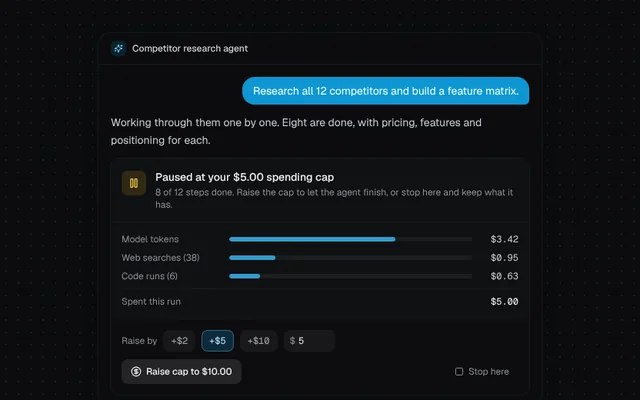
An agent run paused at its budget cap, with a cost breakdown, a raise-cap control that asks to confirm, and stop.
Installation
01
Install with the shadcn CLI. The NiceUI theme comes along the first time.
$ npx shadcn@latest add https://niceui.dev/r/ai-spend-cap.json02
Or copy the source below (2 files). Dependencies: lucide-react.
Source
components/niceui/ai/errors/SpendCap.tsx
import { useEffect, useState } from 'react';
import { CircleDollarSign, Loader2, Pause, Play, Square } from 'lucide-react';
import { cn } from '@/lib/cn';
import { AssistantMsg, Thread, UserMsg, reducedMotion } from './shared';

export type CostLine = { label: string; amount: number };

export type SpendCapProps = {
  cap: number;
  breakdown: CostLine[];
  stepsDone: number;
  stepsTotal: number;
  onContinue: (newCap: number) => void;
  onStop: () => void;
  className?: string;
};

const usd = (n: number) => `$${n.toFixed(2)}`;

export function SpendCap({ cap, breakdown, stepsDone, stepsTotal, onContinue, onStop, className }: SpendCapProps) {
  const spent = breakdown.reduce((s, l) => s + l.amount, 0);
  const [raise, setRaise] = useState(5);
  const [confirm, setConfirm] = useState(false);
  const newCap = cap + raise;

  return (
    <div className={cn('overflow-hidden rounded-xl bg-white/[0.02] shadow-hairline', className)}>
      <div className="flex items-start gap-3 border-b border-white/5 p-3.5">
        <span className="mt-0.5 flex h-8 w-8 shrink-0 items-center justify-center rounded-lg bg-amber-400/15 text-amber-300">
          <Pause className="h-4 w-4" />
        </span>
        <div className="min-w-0 flex-1">
          <p className="text-sm font-medium text-ink-50">Paused at your {usd(cap)} spending cap</p>
          <p className="mt-0.5 text-xs text-ink-400">
            {stepsDone} of {stepsTotal} steps done. Raise the cap to let the agent finish, or stop here and keep what it has.
          </p>
        </div>
      </div>

      <div className="space-y-2 p-3.5">
        {breakdown.map((l) => (
          <div key={l.label} className="flex items-center gap-3 text-xs">
            <span className="w-28 shrink-0 truncate text-ink-400 sm:w-32">{l.label}</span>
            <div className="h-1.5 flex-1 overflow-hidden rounded-full bg-white/5">
              <div className="h-full rounded-full bg-brand-400/80" style={{ width: `${(l.amount / spent) * 100}%` }} />
            </div>
            <span className="w-12 shrink-0 text-right font-mono tabular-nums text-ink-200">{usd(l.amount)}</span>
          </div>
        ))}
        <div className="flex items-center justify-between border-t border-white/5 pt-2 text-xs">
          <span className="text-ink-400">Spent this run</span>
          <span className="font-mono tabular-nums text-ink-50">{usd(spent)}</span>
        </div>
      </div>

      <div className="space-y-2.5 border-t border-white/5 bg-black/20 p-3.5">
        <div className="flex flex-wrap items-center gap-2">
          <span className="text-xs text-ink-400">Raise by</span>
          {[2, 5, 10].map((n) => (
            <button
              key={n}
              onClick={() => (setRaise(n), setConfirm(false))}
              aria-pressed={raise === n}
              className={cn('focus-ring h-7 rounded-lg px-2.5 font-mono text-xs transition-colors', raise === n ? 'bg-brand-500/20 text-brand-200 shadow-[inset_0_0_0_1px_rgba(125,211,252,0.35)]' : 'bg-white/5 text-ink-300 hover:bg-white/10')}
            >
              +${n}
            </button>
          ))}
          <label className="flex h-7 items-center gap-1 rounded-lg bg-white/5 px-2 text-xs text-ink-400 focus-within:ring-1 focus-within:ring-brand-400/50">
            $
            <input
              type="number"
              min={1}
              max={100}
              value={raise}
              onChange={(e) => (setRaise(Math.max(1, Math.min(100, Number(e.target.value) || 1))), setConfirm(false))}
              aria-label="Custom amount"
              className="w-10 bg-transparent font-mono text-ink-100 outline-none"
            />
          </label>
        </div>
        <div className="flex flex-wrap gap-2">
          {confirm ? (
            <button onClick={() => onContinue(newCap)} className="focus-ring inline-flex h-8 items-center gap-1.5 rounded-lg bg-brand-500 px-3 text-xs font-medium text-white hover:bg-brand-400 animate-scale-in">
              <Play className="h-3.5 w-3.5" /> Confirm new cap {usd(newCap)} and continue
            </button>
          ) : (
            <button onClick={() => setConfirm(true)} className="focus-ring inline-flex h-8 items-center gap-1.5 rounded-lg bg-white/10 px-3 text-xs font-medium text-ink-50 hover:bg-white/15">
              <CircleDollarSign className="h-3.5 w-3.5" /> Raise cap to {usd(newCap)}
            </button>
          )}
          <button onClick={onStop} className="focus-ring ml-auto inline-flex h-8 items-center gap-1.5 rounded-lg px-3 text-xs text-ink-400 hover:bg-white/5 hover:text-ink-100">
            <Square className="h-3 w-3" /> Stop here
          </button>
        </div>
      </div>
    </div>
  );
}

const LINES: CostLine[] = [
  { label: 'Model tokens', amount: 3.42 },
  { label: 'Web searches (38)', amount: 0.95 },
  { label: 'Code runs (6)', amount: 0.63 },
];

export function SpendCapDemo() {
  const [mode, setMode] = useState<'paused' | 'running' | 'done' | 'stopped'>('paused');
  const [cap, setCap] = useState(5);
  const [extra, setExtra] = useState(0);

  useEffect(() => {
    if (mode !== 'running') return;
    if (reducedMotion()) {
      setExtra(1.84);
      setMode('done');
      return;
    }
    const start = performance.now();
    const id = window.setInterval(() => {
      const t = (performance.now() - start) / 2600;
      setExtra(Math.min(1.84, 1.84 * t));
      if (t >= 1) {
        clearInterval(id);
        setMode('done');
      }
    }, 80);
    return () => clearInterval(id);
  }, [mode]);

  return (
    <Thread title="Competitor research agent">
      <UserMsg>Research all 12 competitors and build a feature matrix.</UserMsg>
      <AssistantMsg>Working through them one by one. Eight are done, with pricing, features and positioning for each.</AssistantMsg>
      {mode === 'paused' && <SpendCap cap={cap} breakdown={LINES} stepsDone={8} stepsTotal={12} onContinue={(c) => (setCap(c), setMode('running'))} onStop={() => setMode('stopped')} />}
      {mode !== 'paused' && (
        <div className="flex items-center gap-2 rounded-xl bg-white/[0.03] px-3.5 py-2.5 text-xs shadow-hairline animate-fade-up">
          {mode === 'running' && <Loader2 className="h-3.5 w-3.5 animate-spin text-brand-300" />}
          <span className="text-ink-300">
            {mode === 'running' && 'Continuing: steps 9 to 12'}
            {mode === 'done' && 'Finished all 12 competitors'}
            {mode === 'stopped' && 'Stopped. The 8 finished profiles are saved.'}
          </span>
          <span className="ml-auto font-mono tabular-nums text-ink-100">
            {usd(5 + extra)} <span className="text-ink-500">/ {usd(mode === 'stopped' ? 5 : cap)}</span>
          </span>
        </div>
      )}
      {(mode === 'done' || mode === 'stopped') && (
        <button onClick={() => (setExtra(0), setCap(5), setMode('paused'))} className="focus-ring rounded-md px-2 py-1 text-xs text-ink-500 hover:text-ink-200">
          Reset demo
        </button>
      )}
    </Thread>
  );
}
components/niceui/ai/errors/shared.tsx
import { useEffect, useRef, useState, type ReactNode } from 'react';
import { Sparkles } from 'lucide-react';
import { cn } from '@/lib/cn';

export const reducedMotion = () => typeof window !== 'undefined' && window.matchMedia('(prefers-reduced-motion: reduce)').matches;

/** Seconds left until `target` (ms timestamp), ticking every 250ms. */
export function useCountdown(target: number | null) {
  const [now, setNow] = useState(() => Date.now());
  useEffect(() => {
    if (target == null) return;
    const id = window.setInterval(() => setNow(Date.now()), 250);
    return () => clearInterval(id);
  }, [target]);
  return target == null ? 0 : Math.max(0, Math.ceil((target - now) / 1000));
}

export function useTimers() {
  const ids = useRef<number[]>([]);
  useEffect(() => () => ids.current.forEach(clearTimeout), []);
  return (ms: number, fn: () => void) => void ids.current.push(window.setTimeout(fn, ms));
}

export const fmtClock = (s: number) => `${Math.floor(s / 60)}:${String(s % 60).padStart(2, '0')}`;

/** A compact chat thread frame so each state is shown in context. */
export function Thread({ title = 'Research assistant', children, footer, className }: { title?: string; children: ReactNode; footer?: ReactNode; className?: string }) {
  return (
    <div className={cn('mx-auto w-full max-w-xl overflow-hidden rounded-2xl bg-ink-900 shadow-card', className)}>
      <div className="flex items-center gap-2 border-b border-white/5 px-4 py-2.5">
        <span className="flex h-5 w-5 items-center justify-center rounded-md bg-brand-500/15 text-brand-300">
          <Sparkles className="h-3 w-3" />
        </span>
        <span className="text-xs font-medium text-ink-200">{title}</span>
      </div>
      <div className="space-y-3 px-4 py-4">{children}</div>
      {footer && <div className="border-t border-white/5 p-3">{footer}</div>}
    </div>
  );
}

export function UserMsg({ children }: { children: ReactNode }) {
  return (
    <div className="flex justify-end">
      <p className="max-w-[85%] rounded-2xl rounded-br-md bg-brand-500/90 px-3.5 py-2 text-sm text-white">{children}</p>
    </div>
  );
}

export function AssistantMsg({ children }: { children: ReactNode }) {
  return <p className="max-w-[90%] text-sm leading-relaxed text-ink-200">{children}</p>;
}

export function Composer({ disabled, placeholder = 'Ask anything…' }: { disabled?: boolean; placeholder?: string }) {
  return (
    <div className={cn('flex h-10 items-center rounded-xl bg-ink-950/60 px-3 text-sm text-ink-500 shadow-hairline transition-opacity', disabled && 'opacity-50')}>
      {placeholder}
    </div>
  );
}