Multi-step Form New
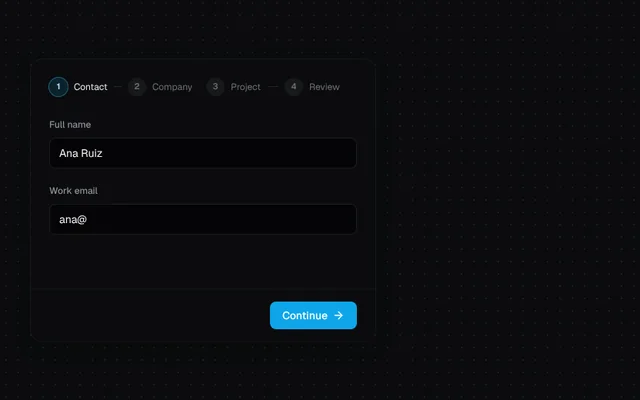
A three-step form with validation on each step, a review step with edit links, and a success state.
Installation
01
Install with the shadcn CLI. The NiceUI theme comes along the first time.
$ npx shadcn@latest add https://niceui.dev/r/application-multi-step-form.json02
Or copy the source below. Dependencies: lucide-react.
Source
components/niceui/app/MultiStepForm.tsx
import { useState } from 'react';
import { ArrowLeft, ArrowRight, Check, LoaderCircle } from 'lucide-react';
import { cn } from '@/lib/cn';

type Data = { name: string; email: string; company: string; size: string; budget: string; goals: string[]; notes: string };
const STEPS = ['Contact', 'Company', 'Project', 'Review'];
const GOALS = ['Faster onboarding', 'Better analytics', 'Lower churn', 'New product line'];

const validate = (step: number, d: Data) => {
  const e: Partial<Record<keyof Data, string>> = {};
  if (step === 0) {
    if (d.name.trim().length < 2) e.name = 'Tell us your name.';
    if (!/^\S+@\S+\.\S+$/.test(d.email)) e.email = 'Enter a valid email.';
  }
  if (step === 1) {
    if (!d.company.trim()) e.company = 'Company is required.';
    if (!d.size) e.size = 'Pick a team size.';
  }
  if (step === 2 && !d.goals.length) e.goals = 'Choose at least one goal.';
  return e;
};

function Input({ label, error, ...rest }: React.InputHTMLAttributes<HTMLInputElement> & { label: string; error?: string }) {
  return (
    <label className="block">
      <span className="text-xs font-medium text-ink-400">{label}</span>
      <input {...rest} aria-invalid={!!error} className={cn('focus-ring mt-1.5 h-10 w-full rounded-lg border bg-ink-950/60 px-3 text-sm text-ink-50 outline-none placeholder:text-ink-500 transition-colors', error ? 'border-rose-400/60' : 'border-white/10 focus:border-brand-400/60')} />
      {error && <span className="mt-1 block text-xs text-rose-300 animate-fade-in">{error}</span>}
    </label>
  );
}

export function MultiStepForm({ onSubmit }: { onSubmit?: (d: Data) => void }) {
  const [step, setStep] = useState(0);
  const [d, setD] = useState<Data>({ name: 'Ana Ruiz', email: 'ana@', company: '', size: '', budget: '$10k–$50k', goals: [], notes: '' });
  const [errors, setErrors] = useState<Partial<Record<keyof Data, string>>>({});
  const [status, setStatus] = useState<'idle' | 'sending' | 'done'>('idle');
  const set = <K extends keyof Data>(k: K, v: Data[K]) => {
    setD((x) => ({ ...x, [k]: v }));
    setErrors((e) => ({ ...e, [k]: undefined }));
  };

  const next = () => {
    const e = validate(step, d);
    setErrors(e);
    if (Object.keys(e).length) return;
    if (step < 3) setStep(step + 1);
    else {
      setStatus('sending');
      window.setTimeout(() => {
        setStatus('done');
        onSubmit?.(d);
      }, 900);
    }
  };

  if (status === 'done')
    return (
      <div className="w-full max-w-md rounded-2xl bg-ink-900 p-8 text-center shadow-card animate-scale-in">
        <span className="mx-auto grid h-12 w-12 place-items-center rounded-full bg-emerald-500/10">
          <Check className="h-6 w-6 text-emerald-400" />
        </span>
        <h3 className="mt-4 text-lg font-semibold text-ink-50">Thanks, {d.name.split(' ')[0]}</h3>
        <p className="mt-1 text-sm text-ink-400">We’ll reply to {d.email} within one business day.</p>
        <button onClick={() => (setStatus('idle'), setStep(0))} className="focus-ring mt-5 text-sm text-brand-300 hover:text-brand-200">
          Start over
        </button>
      </div>
    );

  return (
    <form
      noValidate
      onSubmit={(e) => {
        e.preventDefault();
        next();
      }}
      className="w-full max-w-md overflow-hidden rounded-2xl bg-ink-900 shadow-card"
    >
      <ol className="flex items-center gap-2 px-6 pt-6" aria-label="Progress">
        {STEPS.map((s, i) => (
          <li key={s} className="flex flex-1 items-center gap-2" aria-current={i === step ? 'step' : undefined}>
            <span className={cn('grid h-6 w-6 shrink-0 place-items-center rounded-full text-[11px] font-semibold transition-all duration-300', i < step ? 'bg-brand-500 text-white' : i === step ? 'bg-brand-500/15 text-brand-200 ring-1 ring-brand-400/50' : 'bg-white/5 text-ink-500')}>
              {i < step ? <Check className="h-3.5 w-3.5" /> : i + 1}
            </span>
            <span className={cn('hidden text-xs sm:inline', i === step ? 'text-ink-100' : 'text-ink-500')}>{s}</span>
            {i < 3 && <span className={cn('h-px flex-1 transition-colors', i < step ? 'bg-brand-400/60' : 'bg-white/10')} />}
          </li>
        ))}
      </ol>

      <div key={step} className="min-h-[250px] space-y-4 px-6 py-6 animate-fade-up">
        {step === 0 && (
          <>
            <Input label="Full name" value={d.name} onChange={(e) => set('name', e.target.value)} error={errors.name} autoComplete="name" />
            <Input label="Work email" type="email" value={d.email} onChange={(e) => set('email', e.target.value)} error={errors.email} autoComplete="email" />
          </>
        )}
        {step === 1 && (
          <>
            <Input label="Company" value={d.company} onChange={(e) => set('company', e.target.value)} error={errors.company} placeholder="Northbeam" />
            <div>
              <span className="text-xs font-medium text-ink-400">Team size</span>
              <div role="radiogroup" className="mt-1.5 grid grid-cols-4 gap-1.5">
                {['1–10', '11–50', '51–200', '200+'].map((s) => (
                  <button key={s} type="button" role="radio" aria-checked={d.size === s} onClick={() => set('size', s)} className={cn('focus-ring h-9 rounded-lg border text-sm transition-colors', d.size === s ? 'border-brand-400/60 bg-brand-500/10 text-ink-50' : 'border-white/10 text-ink-300 hover:border-white/20')}>
                    {s}
                  </button>
                ))}
              </div>
              {errors.size && <span className="mt-1 block text-xs text-rose-300">{errors.size}</span>}
            </div>
          </>
        )}
        {step === 2 && (
          <>
            <div>
              <span className="text-xs font-medium text-ink-400">Goals</span>
              <div className="mt-1.5 flex flex-wrap gap-1.5">
                {GOALS.map((g) => {
                  const on = d.goals.includes(g);
                  return (
                    <button key={g} type="button" aria-pressed={on} onClick={() => set('goals', on ? d.goals.filter((x) => x !== g) : [...d.goals, g])} className={cn('focus-ring rounded-full border px-3 py-1.5 text-xs transition-colors', on ? 'border-brand-400/60 bg-brand-500/10 text-brand-100' : 'border-white/10 text-ink-300 hover:border-white/20')}>
                      {on && <Check className="mr-1 inline h-3 w-3" />}
                      {g}
                    </button>
                  );
                })}
              </div>
              {errors.goals && <span className="mt-1 block text-xs text-rose-300">{errors.goals}</span>}
            </div>
            <label className="block">
              <span className="text-xs font-medium text-ink-400">Budget</span>
              <select value={d.budget} onChange={(e) => set('budget', e.target.value)} className="focus-ring mt-1.5 h-10 w-full rounded-lg border border-white/10 bg-ink-950 px-3 text-sm text-ink-50">
                {['Under $10k', '$10k–$50k', '$50k+'].map((b) => (
                  <option key={b}>{b}</option>
                ))}
              </select>
            </label>
            <label className="block">
              <span className="text-xs font-medium text-ink-400">Anything else?</span>
              <textarea value={d.notes} onChange={(e) => set('notes', e.target.value)} rows={2} className="focus-ring mt-1.5 w-full resize-none rounded-lg border border-white/10 bg-ink-950/60 px-3 py-2 text-sm text-ink-50 outline-none focus:border-brand-400/60" />
            </label>
          </>
        )}
        {step === 3 && (
          <dl className="divide-y divide-white/5 rounded-xl border border-white/5 text-sm">
            {[
              ['Name', d.name, 0],
              ['Email', d.email, 0],
              ['Company', `${d.company} · ${d.size}`, 1],
              ['Goals', d.goals.join(', '), 2],
              ['Budget', d.budget, 2],
            ].map(([k, v, s]) => (
              <div key={k as string} className="flex items-start justify-between gap-3 px-3 py-2.5">
                <dt className="text-ink-500">{k}</dt>
                <dd className="min-w-0 flex-1 truncate text-right text-ink-100">{v}</dd>
                <button type="button" onClick={() => setStep(s as number)} className="focus-ring shrink-0 text-xs text-brand-300 hover:text-brand-200">
                  Edit
                </button>
              </div>
            ))}
          </dl>
        )}
      </div>

      <div className="flex items-center justify-between border-t border-white/5 px-6 py-4">
        <button type="button" onClick={() => setStep(step - 1)} className={cn('focus-ring inline-flex items-center gap-1.5 rounded-lg px-2 py-1.5 text-sm text-ink-400 hover:text-ink-100', step === 0 && 'invisible')}>
          <ArrowLeft className="h-4 w-4" /> Back
        </button>
        <button type="submit" disabled={status === 'sending'} className="focus-ring inline-flex items-center gap-1.5 rounded-lg bg-brand-500 px-4 py-2 text-sm font-medium text-white hover:bg-brand-400 disabled:opacity-70">
          {status === 'sending' ? <LoaderCircle className="h-4 w-4 animate-spin" /> : null}
          {step === 3 ? 'Submit' : 'Continue'}
          {step < 3 && <ArrowRight className="h-4 w-4" />}
        </button>
      </div>
    </form>
  );
}

export function MultiStepFormDemo() {
  return <MultiStepForm />;
}