Password Reset New
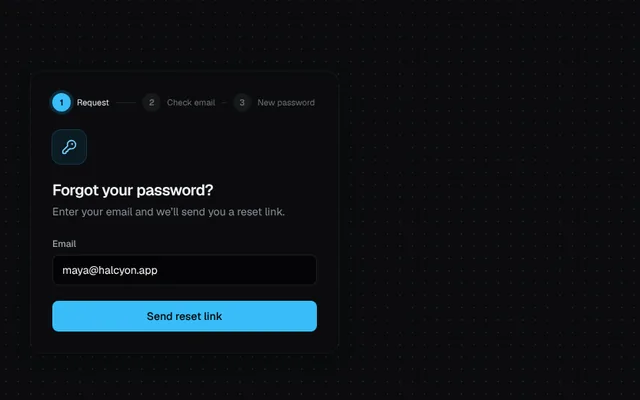
A three-step reset flow: request a link, check email, set a new password with strength meter and confirm, then success.
Installation
01
Install with the shadcn CLI. The NiceUI theme comes along the first time.
$ npx shadcn@latest add https://niceui.dev/r/application-password-reset.json02
Or copy the source below (2 files). Dependencies: lucide-react.
Source
components/niceui/app/PasswordReset.tsx
import { useState, type FormEvent } from 'react';
import { Check, CheckCircle2, KeyRound, MailCheck } from 'lucide-react';
import { cn } from '@/lib/cn';
import { AuthCard, Field, PasswordField, PrimaryButton, StrengthMeter, passwordChecks } from './authUi';

type Step = 0 | 1 | 2 | 3;
const STEPS = ['Request', 'Check email', 'New password'];

export type PasswordResetProps = {
  defaultEmail?: string;
  /** Start on a later step (0 request, 1 sent, 2 new password, 3 done). */
  initialStep?: Step;
  className?: string;
};

export function PasswordReset({ defaultEmail = 'maya@halcyon.app', initialStep = 0, className }: PasswordResetProps) {
  const [step, setStep] = useState<Step>(initialStep);
  const [email, setEmail] = useState(defaultEmail);
  const [pw, setPw] = useState('');
  const [confirm, setConfirm] = useState('');
  const [loading, setLoading] = useState(false);
  const [tried, setTried] = useState(false);

  const wait = (ms: number) => new Promise((r) => setTimeout(r, ms));
  const strong = passwordChecks(pw).filter((c) => c.ok).length >= 3;
  const mismatch = tried && confirm !== pw ? 'Passwords don’t match.' : '';

  const request = async (e: FormEvent) => {
    e.preventDefault();
    setLoading(true);
    await wait(900);
    setLoading(false);
    setStep(1);
  };
  const save = async (e: FormEvent) => {
    e.preventDefault();
    setTried(true);
    if (!strong || pw !== confirm) return;
    setLoading(true);
    await wait(900);
    setLoading(false);
    setStep(3);
  };

  return (
    <AuthCard className={className}>
      <ol className="mb-6 flex items-center gap-2" aria-label="Progress">
        {STEPS.map((s, i) => {
          const done = step > i;
          const on = step === i;
          return (
            <li key={s} className="flex min-w-0 flex-1 items-center gap-2">
              <span className={cn('grid h-6 w-6 shrink-0 place-items-center rounded-full text-[11px] font-semibold transition-all duration-300', done ? 'bg-emerald-400 text-ink-950' : on ? 'bg-brand-400 text-ink-950 ring-4 ring-brand-500/20' : 'bg-white/5 text-ink-500')}>
                {done ? <Check className="h-3.5 w-3.5" /> : i + 1}
              </span>
              <span className={cn('hidden truncate text-[11px] sm:block', on ? 'text-ink-100' : 'text-ink-500')} aria-current={on ? 'step' : undefined}>
                {s}
              </span>
              {i < STEPS.length - 1 && <span className={cn('h-px flex-1 transition-colors duration-500', done ? 'bg-emerald-400/60' : 'bg-white/10')} />}
            </li>
          );
        })}
      </ol>

      <div key={step} className="animate-fade-up">
        {step === 0 && (
          <form onSubmit={request} noValidate>
            <Icon><KeyRound className="h-5 w-5" /></Icon>
            <h2 className="mt-5 text-xl font-semibold tracking-tight text-ink-50">Forgot your password?</h2>
            <p className="mt-1 text-sm text-ink-400">Enter your email and we’ll send you a reset link.</p>
            <Field className="mt-6" label="Email" type="email" value={email} onChange={(e) => setEmail(e.target.value)} />
            <PrimaryButton type="submit" className="mt-5" loading={loading}>Send reset link</PrimaryButton>
          </form>
        )}
        {step === 1 && (
          <div>
            <Icon><MailCheck className="h-5 w-5" /></Icon>
            <h2 className="mt-5 text-xl font-semibold tracking-tight text-ink-50">Reset link sent</h2>
            <p className="mt-1 text-sm text-ink-400">
              If an account exists for <span className="break-all text-ink-100">{email}</span>, you’ll get an email in a minute.
            </p>
            <div className="mt-5 rounded-xl border border-white/10 bg-ink-950/50 p-3 text-xs text-ink-400">
              <p className="font-medium text-ink-200">Reset your Halcyon password</p>
              <p className="mt-1">Click the button below to choose a new password. This link expires in 1 hour.</p>
            </div>
            <PrimaryButton className="mt-5" onClick={() => setStep(2)}>Open the link (demo)</PrimaryButton>
            <button onClick={() => setStep(0)} className="focus-ring mt-3 w-full text-center text-sm text-ink-400 hover:text-ink-100">Use a different email</button>
          </div>
        )}
        {step === 2 && (
          <form onSubmit={save} noValidate>
            <h2 className="text-xl font-semibold tracking-tight text-ink-50">Choose a new password</h2>
            <p className="mt-1 text-sm text-ink-400">Use something you haven’t used before.</p>
            <div className="mt-6 space-y-4">
              <PasswordField label="New password" autoComplete="new-password" value={pw} onChange={(e) => setPw(e.target.value)} error={tried && !strong ? 'Meet at least three requirements.' : ''} />
              <StrengthMeter password={pw} />
              <PasswordField label="Confirm password" autoComplete="new-password" value={confirm} onChange={(e) => setConfirm(e.target.value)} error={mismatch} />
            </div>
            <PrimaryButton type="submit" className="mt-5" loading={loading}>Update password</PrimaryButton>
          </form>
        )}
        {step === 3 && (
          <div className="py-4 text-center">
            <CheckCircle2 className="mx-auto h-12 w-12 text-emerald-400 animate-scale-in" />
            <h2 className="mt-4 text-xl font-semibold text-ink-50">Password updated</h2>
            <p className="mt-1 text-sm text-ink-400">You’ve been signed out of other devices.</p>
            <PrimaryButton className="mt-6" onClick={() => { setStep(0); setPw(''); setConfirm(''); setTried(false); }}>Back to sign in</PrimaryButton>
          </div>
        )}
      </div>
    </AuthCard>
  );
}

function Icon({ children }: { children: React.ReactNode }) {
  return <span className="grid h-11 w-11 place-items-center rounded-xl bg-brand-500/10 text-brand-300 ring-1 ring-brand-400/25">{children}</span>;
}

export function PasswordResetDemo() {
  return <PasswordReset />;
}
components/niceui/app/authUi.tsx
import { useState, type InputHTMLAttributes, type ReactNode } from 'react';
import { Eye, EyeOff, Check, X } from 'lucide-react';
import { cn } from '@/lib/cn';

/** Shared bits for the auth screens. */
export function AuthCard({ children, className }: { children: ReactNode; className?: string }) {
  return <div className={cn('w-full max-w-[400px] rounded-2xl bg-ink-900 p-6 shadow-card sm:p-7', className)}>{children}</div>;
}

export function BrandMark({ className }: { className?: string }) {
  return (
    <span className={cn('inline-flex items-center gap-2 text-sm font-semibold tracking-tight text-ink-50', className)}>
      <span className="grid h-7 w-7 place-items-center rounded-lg bg-gradient-to-br from-brand-300 to-brand-600 shadow-glow">
        <span className="h-2.5 w-2.5 rounded-full bg-ink-950" />
      </span>
      Halcyon
    </span>
  );
}

type FieldProps = InputHTMLAttributes<HTMLInputElement> & { label: string; error?: string; hint?: ReactNode; trailing?: ReactNode };

export function Field({ label, error, hint, trailing, id, className, ...rest }: FieldProps) {
  const fid = id ?? `f-${label.toLowerCase().replace(/\W+/g, '-')}`;
  return (
    <div className={className}>
      <div className="mb-1.5 flex items-center justify-between">
        <label htmlFor={fid} className="text-xs font-medium text-ink-300">
          {label}
        </label>
        {hint}
      </div>
      <div
        className={cn(
          'flex h-10 items-center rounded-lg border bg-ink-950/60 transition-colors focus-within:ring-2',
          error ? 'border-rose-500/60 focus-within:ring-rose-500/25' : 'border-white/10 focus-within:border-brand-400/60 focus-within:ring-brand-500/20',
        )}
      >
        <input id={fid} aria-invalid={!!error} aria-describedby={error ? `${fid}-err` : undefined} className="h-full min-w-0 flex-1 bg-transparent px-3 text-sm text-ink-50 outline-none placeholder:text-ink-600" {...rest} />
        {trailing}
      </div>
      {error && (
        <p id={`${fid}-err`} className="mt-1.5 text-xs text-rose-300 animate-fade-in">
          {error}
        </p>
      )}
    </div>
  );
}

export function PasswordField(props: Omit<FieldProps, 'type' | 'trailing'>) {
  const [show, setShow] = useState(false);
  return (
    <Field
      {...props}
      type={show ? 'text' : 'password'}
      trailing={
        <button type="button" onClick={() => setShow((s) => !s)} aria-label={show ? 'Hide password' : 'Show password'} className="focus-ring mr-1 grid h-8 w-8 place-items-center rounded-md text-ink-500 hover:text-ink-200">
          {show ? <EyeOff className="h-4 w-4" /> : <Eye className="h-4 w-4" />}
        </button>
      }
    />
  );
}

export function PrimaryButton({ children, loading, done, className, ...rest }: React.ButtonHTMLAttributes<HTMLButtonElement> & { loading?: boolean; done?: boolean }) {
  return (
    <button
      {...rest}
      disabled={rest.disabled || loading}
      className={cn(
        'focus-ring relative flex h-10 w-full items-center justify-center gap-2 rounded-lg text-sm font-medium transition-all active:scale-[0.98] disabled:cursor-not-allowed',
        done ? 'bg-emerald-500 text-ink-950' : 'bg-brand-400 text-ink-950 hover:bg-brand-300 disabled:opacity-70',
        className,
      )}
    >
      {loading ? <span className="h-4 w-4 animate-spin rounded-full border-2 border-ink-950/30 border-t-ink-950" /> : done ? <Check className="h-4 w-4 animate-scale-in" /> : null}
      {children}
    </button>
  );
}

function Glyph({ letter, className }: { letter: string; className: string }) {
  return <span className={cn('grid h-4 w-4 place-items-center rounded-[4px] text-[10px] font-bold', className)}>{letter}</span>;
}

export function SsoButtons() {
  return (
    <div className="grid grid-cols-2 gap-2">
      {[
        ['Google', <Glyph key="g" letter="G" className="bg-white text-ink-950" />],
        ['GitHub', <Glyph key="h" letter="H" className="bg-ink-700 text-ink-50" />],
      ].map(([name, icon]) => (
        <button key={name as string} type="button" className="focus-ring flex h-10 items-center justify-center gap-2 rounded-lg border border-white/10 bg-white/[0.03] text-sm text-ink-200 transition-colors hover:bg-white/[0.06]">
          {icon}
          <span className="truncate">{name as string}</span>
        </button>
      ))}
    </div>
  );
}

export function Divider({ label = 'or' }: { label?: string }) {
  return (
    <div className="my-5 flex items-center gap-3 text-[11px] uppercase tracking-wider text-ink-600">
      <span className="h-px flex-1 bg-white/10" />
      {label}
      <span className="h-px flex-1 bg-white/10" />
    </div>
  );
}

export function passwordChecks(pw: string) {
  return [
    { label: 'At least 8 characters', ok: pw.length >= 8 },
    { label: 'An uppercase letter', ok: /[A-Z]/.test(pw) },
    { label: 'A number', ok: /\d/.test(pw) },
    { label: 'A symbol', ok: /[^A-Za-z0-9]/.test(pw) },
  ];
}

export function StrengthMeter({ password }: { password: string }) {
  const checks = passwordChecks(password);
  const score = checks.filter((c) => c.ok).length;
  const label = ['Too weak', 'Weak', 'Fair', 'Good', 'Strong'][score];
  const color = ['bg-ink-700', 'bg-rose-400', 'bg-amber-400', 'bg-brand-400', 'bg-emerald-400'][score];
  return (
    <div className="space-y-2.5">
      <div className="flex items-center gap-2">
        <div className="flex flex-1 gap-1">
          {[0, 1, 2, 3].map((i) => (
            <span key={i} className={cn('h-1 flex-1 rounded-full transition-colors duration-300', i < score ? color : 'bg-white/10')} />
          ))}
        </div>
        <span className="w-16 text-right text-[11px] text-ink-400" aria-live="polite">
          {password ? label : ''}
        </span>
      </div>
      <ul className="grid grid-cols-2 gap-x-3 gap-y-1">
        {checks.map((c) => (
          <li key={c.label} className={cn('flex items-center gap-1.5 text-[11px] transition-colors', c.ok ? 'text-emerald-300' : 'text-ink-500')}>
            {c.ok ? <Check className="h-3 w-3 shrink-0" /> : <X className="h-3 w-3 shrink-0" />}
            <span className="truncate">{c.label}</span>
          </li>
        ))}
      </ul>
    </div>
  );
}