Morphing Tabs
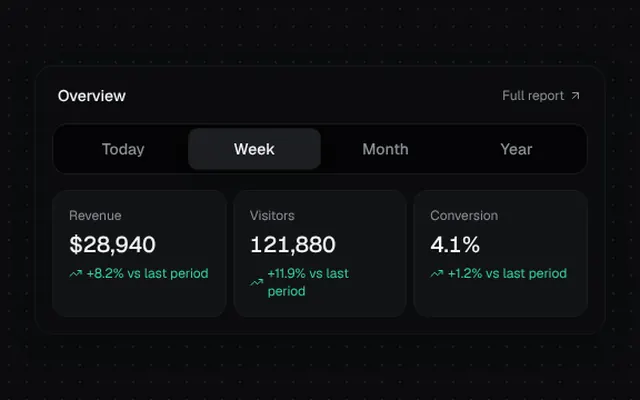
A segmented control whose indicator stretches toward the new tab before settling, while the panels crossfade.
Installation
01
Install with the shadcn CLI. The NiceUI theme comes along the first time.
$ npx shadcn@latest add https://niceui.dev/r/blocks-morphing-tabs.json02
Or copy the source below. Dependencies: lucide-react.
Source
components/niceui/blocks/MorphingTabs.tsx
import { useLayoutEffect, useRef, useState, type ReactNode } from 'react';
import { ArrowUpRight, TrendingDown, TrendingUp } from 'lucide-react';
import { cn } from '@/lib/cn';

export type MorphTab = { id: string; label: string; content: ReactNode };

export type MorphingTabsProps = { tabs: MorphTab[]; defaultValue?: string; onChange?: (id: string) => void };

export function MorphingTabs({ tabs, defaultValue, onChange }: MorphingTabsProps) {
  const [value, setValue] = useState(defaultValue ?? tabs[0].id);
  const [dir, setDir] = useState<1 | -1>(1);
  const [box, setBox] = useState({ left: 0, right: 0, ready: false });
  const listRef = useRef<HTMLDivElement>(null);
  const refs = useRef<Record<string, HTMLButtonElement | null>>({});
  const idx = tabs.findIndex((t) => t.id === value);

  useLayoutEffect(() => {
    const measureNow = () => {
      const el = refs.current[value];
      const list = listRef.current;
      if (!el || !list) return;
      setBox({ left: el.offsetLeft, right: list.clientWidth - el.offsetLeft - el.offsetWidth, ready: true });
    };
    measureNow();
    window.addEventListener('resize', measureNow);
    return () => window.removeEventListener('resize', measureNow);
  }, [value]);

  const select = (id: string) => {
    const next = tabs.findIndex((t) => t.id === id);
    setDir(next > idx ? 1 : -1);
    setValue(id);
    onChange?.(id);
  };

  const lead = 'cubic-bezier(0.34,1.3,0.64,1) 380ms';
  const trail = 'cubic-bezier(0.34,1.2,0.64,1) 420ms 90ms';

  return (
    <div className="w-full">
      <div ref={listRef} role="tablist" className="relative flex rounded-xl bg-ink-950/60 p-1 shadow-hairline">
        <span
          className={cn('absolute inset-y-1 rounded-lg bg-ink-800 shadow-[0_0_0_1px_rgba(255,255,255,0.08),0_4px_12px_-2px_rgba(0,0,0,0.5)]', !box.ready && 'opacity-0')}
          style={{
            left: box.left,
            right: box.right,
            transition: dir === 1 ? `right ${lead}, left ${trail}` : `left ${lead}, right ${trail}`,
          }}
        />
        {tabs.map((t) => (
          <button
            key={t.id}
            ref={(el) => (refs.current[t.id] = el)}
            role="tab"
            aria-selected={value === t.id}
            onClick={() => select(t.id)}
            className={cn('focus-ring relative z-10 flex-1 rounded-lg px-4 py-2 text-sm font-medium transition-colors duration-300', value === t.id ? 'text-ink-50' : 'text-ink-400 hover:text-ink-200')}
          >
            {t.label}
          </button>
        ))}
      </div>
      <div className="mt-4 grid">
        {tabs.map((t, i) => {
          const on = t.id === value;
          const offset = i < idx ? -16 : 16;
          return (
            <div
              key={t.id}
              role="tabpanel"
              aria-hidden={!on}
              className={cn('[grid-area:1/1] transition-all duration-500 ease-smooth', on ? 'opacity-100 blur-0' : 'pointer-events-none opacity-0 blur-sm')}
              style={{ transform: on ? 'none' : `translateX(${offset}px)`, transitionDelay: on ? '80ms' : '0ms' }}
            >
              {t.content}
            </div>
          );
        })}
      </div>
    </div>
  );
}

function Stat({ label, value, delta }: { label: string; value: string; delta: number }) {
  const up = delta >= 0;
  return (
    <div className="rounded-xl bg-ink-850 p-3.5 shadow-hairline">
      <p className="text-xs text-ink-400">{label}</p>
      <p className="mt-1 text-xl font-medium tabular-nums text-ink-50">{value}</p>
      <p className={cn('mt-1 flex items-center gap-1 text-xs', up ? 'text-emerald-400' : 'text-rose-400')}>
        {up ? <TrendingUp className="h-3 w-3" /> : <TrendingDown className="h-3 w-3" />}
        {up ? '+' : ''}{delta}% vs last period
      </p>
    </div>
  );
}

const PERIODS = [
  { id: 'day', label: 'Today', stats: [['Revenue', '$4,281', 12.4], ['Visitors', '18,204', 4.1], ['Conversion', '3.8%', -0.6]] },
  { id: 'week', label: 'Week', stats: [['Revenue', '$28,940', 8.2], ['Visitors', '121,880', 11.9], ['Conversion', '4.1%', 1.2]] },
  { id: 'month', label: 'Month', stats: [['Revenue', '$118,302', 21.7], ['Visitors', '502,114', 18.3], ['Conversion', '4.4%', 2.4]] },
  { id: 'year', label: 'Year', stats: [['Revenue', '$1.24M', 64.0], ['Visitors', '5.9M', 48.2], ['Conversion', '3.9%', -1.1]] },
] as const;

export function MorphingTabsDemo() {
  return (
    <div className="mx-auto w-full max-w-lg rounded-2xl bg-ink-900 p-4 shadow-card">
      <div className="mb-4 flex items-center justify-between px-1">
        <p className="text-sm font-medium text-ink-50">Overview</p>
        <a href="#" onClick={(e) => e.preventDefault()} className="flex items-center gap-1 text-xs text-ink-400 transition-colors hover:text-ink-100">
          Full report <ArrowUpRight className="h-3 w-3" />
        </a>
      </div>
      <MorphingTabs
        defaultValue="week"
        tabs={PERIODS.map((p) => ({
          id: p.id,
          label: p.label,
          content: (
            <div className="grid grid-cols-3 gap-2">
              {p.stats.map(([l, v, d]) => <Stat key={l} label={l} value={v} delta={d} />)}
            </div>
          ),
        }))}
      />
    </div>
  );
}