Wheel Picker
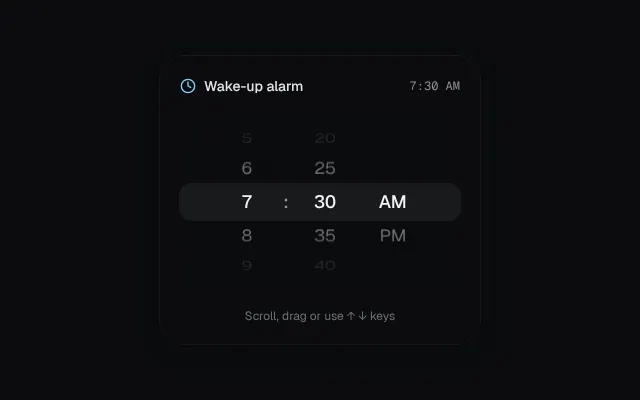
iOS-style scroll-snapping wheels with 3D rotation and depth fade.
Installation
01
Install with the shadcn CLI. The NiceUI theme comes along the first time.
$ npx shadcn@latest add https://niceui.dev/r/components-wheel-picker.json02
Or copy the source below. Dependencies: lucide-react.
Source
components/niceui/ui/motion/WheelPicker.tsx
import { useEffect, useRef, useState } from 'react';
import { Clock } from 'lucide-react';
import { cn } from '@/lib/cn';

const ITEM = 36;
const VISIBLE = 5;

export type WheelProps = {
  options: string[];
  value: string;
  onChange: (v: string) => void;
  width?: number;
  label?: string;
};

/** A single scroll-snapped wheel; items rotate on X and fade with distance from the center. */
export function Wheel({ options, value, onChange, width = 64, label }: WheelProps) {
  const ref = useRef<HTMLDivElement>(null);
  const [top, setTop] = useState(0);
  const settle = useRef<number>();
  const pad = ((VISIBLE - 1) / 2) * ITEM;

  useEffect(() => {
    const el = ref.current;
    const i = options.indexOf(value);
    if (!el || i < 0) return;
    if (Math.round(el.scrollTop / ITEM) !== i) el.scrollTo({ top: i * ITEM, behavior: el.scrollTop === 0 && top === 0 ? 'auto' : 'smooth' });
    // eslint-disable-next-line react-hooks/exhaustive-deps
  }, [value, options]);

  const onScroll = () => {
    const el = ref.current;
    if (!el) return;
    setTop(el.scrollTop);
    window.clearTimeout(settle.current);
    settle.current = window.setTimeout(() => {
      const i = Math.max(0, Math.min(options.length - 1, Math.round(el.scrollTop / ITEM)));
      if (options[i] !== value) onChange(options[i]);
    }, 90);
  };

  return (
    <div
      ref={ref}
      onScroll={onScroll}
      role="listbox"
      aria-label={label}
      tabIndex={0}
      onKeyDown={(e) => {
        const i = options.indexOf(value);
        if (e.key === 'ArrowDown' && i < options.length - 1) onChange(options[i + 1]);
        if (e.key === 'ArrowUp' && i > 0) onChange(options[i - 1]);
      }}
      className="relative snap-y snap-mandatory overflow-y-scroll overscroll-contain outline-none [scrollbar-width:none] [&::-webkit-scrollbar]:hidden"
      style={{ height: ITEM * VISIBLE, width, perspective: 600 }}
    >
      <div style={{ paddingTop: pad, paddingBottom: pad }}>
        {options.map((o, i) => {
          const d = (i * ITEM - top) / ITEM; // distance in rows from center
          const clamped = Math.max(-2.6, Math.min(2.6, d));
          return (
            <div
              key={o}
              role="option"
              aria-selected={o === value}
              onClick={() => onChange(o)}
              className={cn('flex snap-center items-center justify-center text-lg tabular-nums', Math.abs(d) < 0.5 ? 'font-medium text-ink-50' : 'text-ink-300')}
              style={{
                height: ITEM,
                transform: `rotateX(${-clamped * 22}deg) translateZ(${-Math.abs(clamped) * 6}px)`,
                opacity: Math.max(0.12, 1 - Math.abs(d) * 0.32),
              }}
            >
              {o}
            </div>
          );
        })}
      </div>
    </div>
  );
}

const HOURS = Array.from({ length: 12 }, (_, i) => String(i + 1));
const MINUTES = Array.from({ length: 12 }, (_, i) => String(i * 5).padStart(2, '0'));
const PERIODS = ['AM', 'PM'];

export function WheelPickerDemo() {
  const [h, setH] = useState('7');
  const [m, setM] = useState('30');
  const [p, setP] = useState('AM');
  const time = `${h}:${m} ${p}`;

  return (
    <div className="mx-auto w-full max-w-xs">
      <div className="rounded-3xl bg-ink-900 p-5 shadow-card">
        <div className="mb-4 flex items-center justify-between">
          <span className="flex items-center gap-2 text-sm font-medium text-ink-100">
            <Clock className="h-4 w-4 text-brand-300" /> Wake-up alarm
          </span>
          <span key={time} className="animate-fade-in font-mono text-xs text-ink-400">{time}</span>
        </div>
        <div className="relative flex justify-center gap-1">
          <div className="pointer-events-none absolute inset-x-0 top-1/2 h-9 -translate-y-1/2 rounded-xl bg-white/[0.06] shadow-hairline" />
          <div className="pointer-events-none absolute inset-x-0 top-0 z-10 h-16 bg-gradient-to-b from-ink-900 to-transparent" />
          <div className="pointer-events-none absolute inset-x-0 bottom-0 z-10 h-16 bg-gradient-to-t from-ink-900 to-transparent" />
          <Wheel label="Hour" options={HOURS} value={h} onChange={setH} />
          <span className="flex items-center text-lg font-medium text-ink-400">:</span>
          <Wheel label="Minute" options={MINUTES} value={m} onChange={setM} />
          <Wheel label="Period" options={PERIODS} value={p} onChange={setP} />
        </div>
        <p className="mt-4 text-center text-xs text-ink-500">Scroll, drag or use ↑ ↓ keys</p>
      </div>
    </div>
  );
}