Infinite Canvas New
An endless wall of images you drag in any direction, with inertia, a slow drift and a lightbox for the one you click.
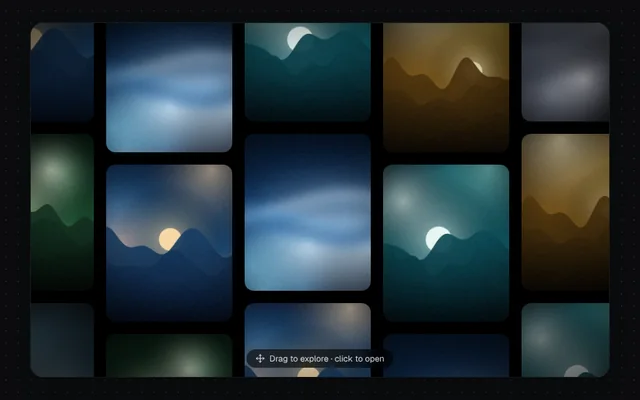
Installation
01
Install with the shadcn CLI. The NiceUI theme comes along the first time.
$ npx shadcn@latest add https://niceui.dev/r/gallery-canvas-gallery.json02
Or copy the source below (2 files). Dependencies: lucide-react.
Source
components/niceui/gallery/CanvasGallery.tsx
import { useEffect, useMemo, useRef, useState } from 'react';
import { Move, X } from 'lucide-react';
import { cn } from '@/lib/cn';
import { ARTWORKS, artwork } from './art';

const CELL_W = 180;
const CELL_H = 220;

/** An endless, draggable wall of images. Tiles repeat in both directions. */
export function CanvasGallery({ images, height = 460, className }: { images: string[]; height?: number; className?: string }) {
  const box = useRef<HTMLDivElement>(null);
  const [pos, setPos] = useState({ x: -40, y: -60 });
  const [size, setSize] = useState({ w: 800, h: height });
  const [open, setOpen] = useState<number | null>(null);
  const vel = useRef({ x: 0, y: 0 });
  const drag = useRef<{ x: number; y: number; moved: number } | null>(null);

  useEffect(() => {
    const el = box.current;
    if (!el) return;
    const ro = new ResizeObserver(() => setSize({ w: el.clientWidth, h: el.clientHeight }));
    ro.observe(el);
    return () => ro.disconnect();
  }, []);

  useEffect(() => {
    let raf = 0;
    const reduce = window.matchMedia('(prefers-reduced-motion: reduce)').matches;
    const tick = () => {
      if (!drag.current) {
        const v = vel.current;
        if (Math.abs(v.x) + Math.abs(v.y) > 0.05) {
          setPos((p) => ({ x: p.x + v.x, y: p.y + v.y }));
          v.x *= 0.94;
          v.y *= 0.94;
        } else if (!reduce && open === null) setPos((p) => ({ x: p.x - 0.25, y: p.y - 0.12 }));
      }
      raf = requestAnimationFrame(tick);
    };
    raf = requestAnimationFrame(tick);
    return () => cancelAnimationFrame(raf);
  }, [open]);

  const cols = Math.ceil(size.w / CELL_W) + 2;
  const rows = Math.ceil(size.h / CELL_H) + 2;
  const c0 = Math.floor(-pos.x / CELL_W) - 1;
  const r0 = Math.floor(-pos.y / CELL_H) - 1;
  const tiles = [];
  for (let r = r0; r < r0 + rows; r++)
    for (let c = c0; c < c0 + cols; c++) {
      const k = (((r * 5 + c * 7) % images.length) + images.length) % images.length;
      tiles.push({ r, c, k });
    }

  return (
    <div
      ref={box}
      className={cn('relative w-full cursor-grab touch-none select-none overflow-hidden rounded-2xl bg-ink-950 shadow-card active:cursor-grabbing', className)}
      style={{ height }}
      tabIndex={0}
      aria-label="Image canvas. Drag or use arrow keys to pan."
      onKeyDown={(e) => {
        const d = 40;
        if (e.key === 'ArrowLeft') vel.current.x += d / 6;
        if (e.key === 'ArrowRight') vel.current.x -= d / 6;
        if (e.key === 'ArrowUp') vel.current.y += d / 6;
        if (e.key === 'ArrowDown') vel.current.y -= d / 6;
        if (e.key === 'Escape') setOpen(null);
      }}
      onPointerDown={(e) => {
        drag.current = { x: e.clientX, y: e.clientY, moved: 0 };
        vel.current = { x: 0, y: 0 };
        (e.currentTarget as HTMLElement).setPointerCapture(e.pointerId);
      }}
      onPointerMove={(e) => {
        const d = drag.current;
        if (!d) return;
        const dx = e.clientX - d.x;
        const dy = e.clientY - d.y;
        d.x = e.clientX;
        d.y = e.clientY;
        d.moved += Math.abs(dx) + Math.abs(dy);
        vel.current = { x: dx, y: dy };
        setPos((p) => ({ x: p.x + dx, y: p.y + dy }));
      }}
      onPointerUp={(e) => {
        const d = drag.current;
        drag.current = null;
        if (d && d.moved < 6) {
          const t = (e.target as HTMLElement).closest('[data-k]') as HTMLElement | null;
          if (t) setOpen(Number(t.dataset.k));
        }
      }}
    >
      {tiles.map(({ r, c, k }) => (
        <div
          key={`${r}:${c}`}
          data-k={k}
          className="absolute p-2"
          style={{ width: CELL_W, height: CELL_H, transform: `translate(${pos.x + c * CELL_W}px, ${pos.y + r * CELL_H + (c % 2 ? 40 : 0)}px)` }}
        >
          <img src={images[k]} alt="" draggable={false} className="h-full w-full rounded-xl object-cover transition-transform duration-300 hover:scale-[1.03]" />
        </div>
      ))}
      <div className="pointer-events-none absolute inset-0 bg-[radial-gradient(ellipse_at_center,transparent_55%,rgba(0,0,0,0.65))]" />
      <span className="pointer-events-none absolute bottom-3 left-1/2 flex -translate-x-1/2 items-center gap-1.5 rounded-full bg-black/60 px-3 py-1 text-[11px] text-white/80 backdrop-blur">
        <Move className="h-3 w-3" /> Drag to explore · click to open
      </span>
      {open !== null && (
        <div className="absolute inset-0 z-10 grid place-items-center bg-black/80 p-6 backdrop-blur-sm animate-fade-in" onPointerDown={(e) => e.stopPropagation()}>
          <figure className="max-w-md animate-scale-in">
            <img src={images[open]} alt={ARTWORKS[open % ARTWORKS.length].title} className="max-h-[300px] w-full rounded-xl object-cover shadow-pop" />
            <figcaption className="mt-3 flex items-baseline justify-between gap-3">
              <span className="font-serif text-xl italic text-white">{ARTWORKS[open % ARTWORKS.length].title}</span>
              <span className="font-mono text-[11px] text-white/60">{ARTWORKS[open % ARTWORKS.length].artist}</span>
            </figcaption>
          </figure>
          <button onClick={() => setOpen(null)} aria-label="Close" className="focus-ring absolute right-3 top-3 grid h-8 w-8 place-items-center rounded-full bg-white/10 text-white hover:bg-white/20">
            <X className="h-4 w-4" />
          </button>
        </div>
      )}
    </div>
  );
}

export function CanvasGalleryDemo() {
  const images = useMemo(() => ARTWORKS.map((a) => artwork(a.id, 360, 440)), []);
  return <CanvasGallery images={images} />;
}
components/niceui/gallery/art.ts
/*
 * Procedural artwork for the gallery demos: soft landscapes and abstract mesh
 * gradients with film grain, rendered once to data URLs. Swap `src` for real
 * photos in your app — every gallery component just takes image URLs.
 */

export type Artwork = { id: number; title: string; artist: string; place: string; year: number; tone: 'warm' | 'cool' | 'dusk' | 'mono' };

const PALETTES: string[][] = [
  ['#0b1d3a', '#1f4e79', '#f2a65a', '#f7d9a8'],
  ['#120c26', '#4b2a77', '#e66b9d', '#ffd1b3'],
  ['#06222b', '#0f5f6b', '#7fd1c7', '#e8f6f1'],
  ['#1b1410', '#5b3a26', '#d98c4a', '#f6e1c3'],
  ['#0e0f13', '#2b2f3a', '#8a93a6', '#e6e8ee'],
  ['#0a1a12', '#1f5134', '#9cc98a', '#f1f7da'],
  ['#1a0f14', '#6b1f3a', '#ef6f5e', '#ffd8a8'],
  ['#071426', '#123f73', '#5aa9e6', '#d6ecff'],
  ['#191325', '#3b2d5c', '#b39ddb', '#f3e9ff'],
  ['#201608', '#6e4a12', '#e0b34a', '#fff1c4'],
  ['#0b1216', '#29424f', '#6fa3b8', '#f0e6d2'],
  ['#170b0b', '#4a1414', '#c84b31', '#f5c26b'],
];

export const ARTWORKS: Artwork[] = [
  { id: 0, title: 'Low Tide, Dawn', artist: 'Mira Okafor', place: 'Comporta', year: 2025, tone: 'warm' },
  { id: 1, title: 'Neon Bloom', artist: 'Ilya Varga', place: 'Kyoto', year: 2024, tone: 'dusk' },
  { id: 2, title: 'Glass Lagoon', artist: 'Sana Iqbal', place: 'Faroe Islands', year: 2025, tone: 'cool' },
  { id: 3, title: 'Copper Dunes', artist: 'Teo Marchetti', place: 'Merzouga', year: 2023, tone: 'warm' },
  { id: 4, title: 'Fog Study No. 4', artist: 'Lena Brandt', place: 'Dolomites', year: 2024, tone: 'mono' },
  { id: 5, title: 'Green Hour', artist: 'Ravi Menon', place: 'Munnar', year: 2025, tone: 'cool' },
  { id: 6, title: 'Ember Coast', artist: 'Noor Haddad', place: 'Big Sur', year: 2024, tone: 'warm' },
  { id: 7, title: 'Blue Hour Harbour', artist: 'Jonas Weber', place: 'Bergen', year: 2025, tone: 'cool' },
  { id: 8, title: 'Lavender Field', artist: 'Camille Roy', place: 'Valensole', year: 2023, tone: 'dusk' },
  { id: 9, title: 'Golden Ridge', artist: 'Aiko Tanaka', place: 'Hokkaido', year: 2025, tone: 'warm' },
  { id: 10, title: 'Salt Flats', artist: 'Diego Alvarez', place: 'Uyuni', year: 2024, tone: 'mono' },
  { id: 11, title: 'Red Canyon', artist: 'Hana Kobayashi', place: 'Arizona', year: 2025, tone: 'warm' },
];

let seedState = 1;
const rand = () => {
  seedState = (seedState * 1664525 + 1013904223) >>> 0;
  return seedState / 4294967296;
};

const cache = new Map<string, string>();

/** A deterministic artwork as a data URL. `kind` picks a landscape or an abstract mesh. */
export function artwork(id: number, w = 960, h = 640, kind: 'landscape' | 'mesh' = id % 3 === 1 ? 'mesh' : 'landscape'): string {
  const key = `${id}-${w}-${h}-${kind}`;
  const hit = cache.get(key);
  if (hit) return hit;
  if (typeof document === 'undefined') return '';
  const c = document.createElement('canvas');
  c.width = w;
  c.height = h;
  const g = c.getContext('2d');
  if (!g) return '';
  seedState = (id + 1) * 9973;
  const [deep, mid, hot, light] = PALETTES[id % PALETTES.length];

  const sky = g.createLinearGradient(0, 0, 0, h);
  sky.addColorStop(0, deep);
  sky.addColorStop(0.55, mid);
  sky.addColorStop(1, kind === 'mesh' ? deep : hot);
  g.fillStyle = sky;
  g.fillRect(0, 0, w, h);

  // soft light blobs
  const blobs = kind === 'mesh' ? 6 : 3;
  for (let i = 0; i < blobs; i++) {
    const x = rand() * w;
    const y = rand() * h * (kind === 'mesh' ? 1 : 0.6);
    const r = (0.25 + rand() * 0.45) * Math.max(w, h);
    const rg = g.createRadialGradient(x, y, 0, x, y, r);
    rg.addColorStop(0, [hot, light, mid][i % 3] + 'cc');
    rg.addColorStop(1, 'transparent');
    g.globalCompositeOperation = 'screen';
    g.fillStyle = rg;
    g.fillRect(0, 0, w, h);
  }
  g.globalCompositeOperation = 'source-over';

  if (kind === 'landscape') {
    // sun
    const sx = (0.25 + rand() * 0.5) * w;
    const sy = h * (0.38 + rand() * 0.12);
    const sr = Math.min(w, h) * (0.07 + rand() * 0.05);
    const glow = g.createRadialGradient(sx, sy, 0, sx, sy, sr * 5);
    glow.addColorStop(0, light + 'aa');
    glow.addColorStop(1, 'transparent');
    g.fillStyle = glow;
    g.fillRect(0, 0, w, h);
    g.fillStyle = light;
    g.beginPath();
    g.arc(sx, sy, sr, 0, Math.PI * 2);
    g.fill();
    // ridges, back to front
    for (let layer = 0; layer < 4; layer++) {
      const base = h * (0.5 + layer * 0.12);
      const amp = h * (0.12 - layer * 0.02);
      const f1 = 1.5 + rand() * 2;
      const f2 = 4 + rand() * 4;
      const ph = rand() * 10;
      g.beginPath();
      g.moveTo(0, h);
      for (let x = 0; x <= w; x += 4) {
        const u = x / w;
        const y = base - amp * (0.6 * Math.sin(u * f1 * Math.PI + ph) + 0.3 * Math.sin(u * f2 * Math.PI + ph * 2) + 0.1 * Math.sin(u * 23 + ph));
        g.lineTo(x, y);
      }
      g.lineTo(w, h);
      g.closePath();
      const t = layer / 3;
      const lg = g.createLinearGradient(0, base - amp, 0, h);
      lg.addColorStop(0, mix(mid, deep, 0.25 + t * 0.6));
      lg.addColorStop(1, mix(deep, '#000000', t * 0.5));
      g.fillStyle = lg;
      g.globalAlpha = 0.92;
      g.fill();
      g.globalAlpha = 1;
    }
  } else {
    // flowing ribbons
    for (let i = 0; i < 3; i++) {
      g.beginPath();
      const y0 = h * (0.2 + rand() * 0.6);
      g.moveTo(-50, y0);
      g.bezierCurveTo(w * 0.3, y0 - h * (rand() - 0.5), w * 0.7, y0 + h * (rand() - 0.5), w + 50, y0 + h * (rand() - 0.5) * 0.6);
      g.lineWidth = Math.min(w, h) * (0.08 + rand() * 0.12);
      g.strokeStyle = [light, hot, mid][i] + '55';
      g.filter = `blur(${Math.round(Math.min(w, h) * 0.04)}px)`;
      g.stroke();
      g.filter = 'none';
    }
  }

  // vignette
  const vg = g.createRadialGradient(w / 2, h / 2, Math.min(w, h) * 0.3, w / 2, h / 2, Math.max(w, h) * 0.75);
  vg.addColorStop(0, 'transparent');
  vg.addColorStop(1, 'rgba(0,0,0,0.45)');
  g.fillStyle = vg;
  g.fillRect(0, 0, w, h);

  // film grain
  const img = g.getImageData(0, 0, w, h);
  const d = img.data;
  for (let i = 0; i < d.length; i += 4) {
    const n = (rand() - 0.5) * 18;
    d[i] += n;
    d[i + 1] += n;
    d[i + 2] += n;
  }
  g.putImageData(img, 0, 0);

  const url = c.toDataURL('image/jpeg', 0.86);
  cache.set(key, url);
  return url;
}

function mix(a: string, b: string, t: number) {
  const pa = parseInt(a.slice(1), 16);
  const pb = parseInt(b.slice(1), 16);
  const ch = (s: number) => Math.round(((pa >> s) & 255) * (1 - t) + ((pb >> s) & 255) * t);
  return `rgb(${ch(16)},${ch(8)},${ch(0)})`;
}