Attachments New
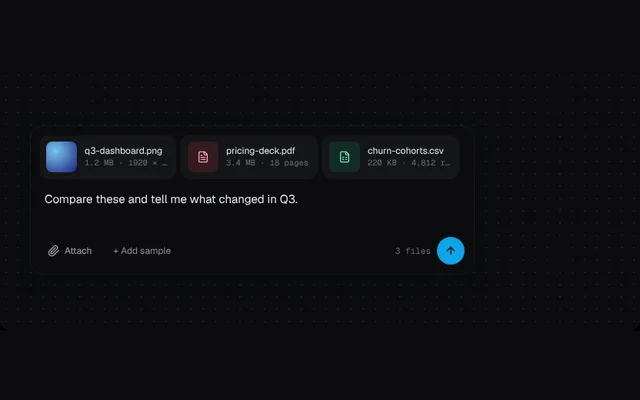
A composer that takes files by drag and drop, paste or picker, with upload progress, image thumbnails and page or row counts.
Installation
01
Install with the shadcn CLI. The NiceUI theme comes along the first time.
$ npx shadcn@latest add https://niceui.dev/r/ai-attachment-dropzone.json02
Or copy the source below (2 files). Dependencies: lucide-react.
Source
components/niceui/ai/io/AttachmentDropzone.tsx
import { useEffect, useRef, useState } from 'react';
import { ArrowUp, FileSpreadsheet, FileText, ImageIcon, Paperclip, UploadCloud, X } from 'lucide-react';
import { cn } from '@/lib/cn';
import { prefersReducedMotion } from './shared';

type Kind = 'image' | 'pdf' | 'sheet' | 'text';
type Item = { id: number; name: string; size: string; kind: Kind; progress: number; meta?: string; hue?: number };

const SAMPLES: Omit<Item, 'id' | 'progress'>[] = [
  { name: 'q3-dashboard.png', size: '1.2 MB', kind: 'image', meta: '1920 × 1080', hue: 200 },
  { name: 'pricing-deck.pdf', size: '3.4 MB', kind: 'pdf', meta: '18 pages' },
  { name: 'churn-cohorts.csv', size: '220 KB', kind: 'sheet', meta: '4,812 rows' },
  { name: 'whiteboard.jpg', size: '860 KB', kind: 'image', meta: '1280 × 960', hue: 32 },
  { name: 'notes.md', size: '6 KB', kind: 'text', meta: '142 lines' },
];

const ICON = { image: ImageIcon, pdf: FileText, sheet: FileSpreadsheet, text: FileText };

const kindOf = (f: File): Kind => (f.type.startsWith('image/') ? 'image' : f.type === 'application/pdf' ? 'pdf' : /csv|sheet|excel/.test(f.type) ? 'sheet' : 'text');
const fmt = (b: number) => (b > 1e6 ? `${(b / 1e6).toFixed(1)} MB` : `${Math.max(1, Math.round(b / 1e3))} KB`);

export type AttachmentDropzoneProps = { initial?: number; className?: string };

/** Composer with drag-and-drop, paste and simulated uploads. Files never leave the browser. */
export function AttachmentDropzone({ initial = 3, className }: AttachmentDropzoneProps) {
  const [items, setItems] = useState<Item[]>([]);
  const [over, setOver] = useState(false);
  const [text, setText] = useState('Compare these and tell me what changed in Q3.');
  const next = useRef(0);
  const sample = useRef(0);

  const add = (it: Omit<Item, 'id' | 'progress'>) => setItems((list) => [...list, { ...it, id: next.current++, progress: prefersReducedMotion() ? 1 : 0 }]);
  const addSample = () => add(SAMPLES[sample.current++ % SAMPLES.length]);

  const seeded = useRef(false);
  useEffect(() => {
    if (seeded.current) return;
    seeded.current = true;
    for (let i = 0; i < initial; i++) addSample();
    // eslint-disable-next-line react-hooks/exhaustive-deps
  }, []);

  // Simulated upload progress.
  useEffect(() => {
    if (!items.some((i) => i.progress < 1)) return;
    const id = window.setInterval(() => setItems((list) => list.map((i, k) => (i.progress < 1 ? { ...i, progress: Math.min(1, i.progress + 0.04 + (k % 3) * 0.015) } : i))), 80);
    return () => clearInterval(id);
  }, [items]);

  const addFiles = (files: FileList | File[]) =>
    [...files].slice(0, 6).forEach((f) => add({ name: f.name || 'pasted-image.png', size: fmt(f.size), kind: kindOf(f), meta: f.type || 'file', hue: 210 }));

  const uploading = items.some((i) => i.progress < 1);

  return (
    <div
      className={cn('relative w-full max-w-xl rounded-2xl bg-ink-900 p-3 shadow-card', className)}
      onDragEnter={(e) => {
        e.preventDefault();
        setOver(true);
      }}
      onDragOver={(e) => e.preventDefault()}
      onDragLeave={(e) => e.currentTarget === e.target && setOver(false)}
      onDrop={(e) => {
        e.preventDefault();
        setOver(false);
        if (e.dataTransfer.files.length) addFiles(e.dataTransfer.files);
      }}
      onPaste={(e) => {
        const files = [...e.clipboardData.files];
        if (files.length) {
          e.preventDefault();
          addFiles(files);
        }
      }}
    >
      {items.length > 0 && (
        <ul className="mb-2 flex gap-2 overflow-x-auto pb-1 [scrollbar-width:none]">
          {items.map((it) => {
            const Icon = ICON[it.kind];
            const done = it.progress >= 1;
            return (
              <li key={it.id} className="group relative flex w-44 shrink-0 animate-scale-in items-center gap-2.5 rounded-xl bg-white/[0.04] p-2 ring-1 ring-white/5">
                {it.kind === 'image' ? (
                  <span className="h-10 w-10 shrink-0 overflow-hidden rounded-lg" style={{ background: `radial-gradient(circle at 30% 30%, hsl(${it.hue} 80% 70%), hsl(${(it.hue ?? 0) + 40} 60% 30%))` }} aria-hidden />
                ) : (
                  <span className={cn('flex h-10 w-10 shrink-0 items-center justify-center rounded-lg', it.kind === 'pdf' ? 'bg-rose-500/15 text-rose-300' : it.kind === 'sheet' ? 'bg-emerald-500/15 text-emerald-300' : 'bg-white/5 text-ink-300')}>
                    <Icon className="h-4 w-4" />
                  </span>
                )}
                <span className="min-w-0 flex-1">
                  <span className="block truncate text-xs text-ink-100">{it.name}</span>
                  <span className="block truncate font-mono text-[10.5px] text-ink-500">{done ? `${it.size} · ${it.meta}` : `Uploading ${Math.round(it.progress * 100)}%`}</span>
                  {!done && (
                    <span className="mt-1 block h-0.5 overflow-hidden rounded-full bg-white/10">
                      <span className="block h-full rounded-full bg-brand-400 transition-[width]" style={{ width: `${it.progress * 100}%` }} />
                    </span>
                  )}
                </span>
                <button onClick={() => setItems((l) => l.filter((x) => x.id !== it.id))} aria-label={`Remove ${it.name}`} className="focus-ring absolute -right-1.5 -top-1.5 flex h-5 w-5 items-center justify-center rounded-full bg-ink-700 text-ink-200 opacity-0 transition-opacity hover:bg-ink-600 group-hover:opacity-100 focus-visible:opacity-100">
                  <X className="h-3 w-3" />
                </button>
              </li>
            );
          })}
        </ul>
      )}

      <textarea value={text} onChange={(e) => setText(e.target.value)} rows={2} aria-label="Message" placeholder="Ask anything, or paste an image…" className="w-full resize-none bg-transparent px-1.5 py-1 text-[15px] text-ink-100 outline-none placeholder:text-ink-500" />

      <div className="mt-1 flex flex-wrap items-center gap-2">
        <label className="focus-within:ring-2 flex h-9 cursor-pointer items-center gap-1.5 rounded-lg px-2.5 text-xs text-ink-300 ring-brand-500/60 transition-colors hover:bg-white/5">
          <Paperclip className="h-4 w-4" /> Attach
          <input type="file" multiple className="sr-only" onChange={(e) => e.target.files && addFiles(e.target.files)} />
        </label>
        <button onClick={addSample} className="focus-ring h-9 rounded-lg px-2.5 text-xs text-ink-400 transition-colors hover:bg-white/5 hover:text-ink-200">
          + Add sample
        </button>
        <span className="ml-auto hidden font-mono text-[11px] text-ink-500 sm:inline">{items.length} file{items.length === 1 ? '' : 's'}</span>
        <button disabled={uploading || (!text && !items.length)} aria-label="Send" className="focus-ring flex h-9 w-9 items-center justify-center rounded-full bg-brand-500 text-ink-950 transition-all hover:bg-brand-400 active:scale-95 disabled:bg-white/10 disabled:text-ink-500">
          <ArrowUp className="h-4 w-4" />
        </button>
      </div>

      <div className={cn('pointer-events-none absolute inset-0 flex flex-col items-center justify-center gap-2 rounded-2xl border-2 border-dashed border-brand-400/70 bg-ink-950/85 backdrop-blur-sm transition-opacity duration-200', over ? 'opacity-100' : 'opacity-0')}>
        <UploadCloud className="h-7 w-7 text-brand-300" />
        <p className="text-sm text-ink-100">Drop files to attach</p>
        <p className="text-xs text-ink-500">Images, PDFs, spreadsheets and text</p>
      </div>
    </div>
  );
}

export function AttachmentDropzoneDemo() {
  return <AttachmentDropzone />;
}
components/niceui/ai/io/shared.ts
import { useEffect, useRef, useState } from 'react';

export const prefersReducedMotion = () => typeof window !== 'undefined' && window.matchMedia('(prefers-reduced-motion: reduce)').matches;

/** Seconds elapsed while `active`, ticking at `fps`. */
export function useTicker(active: boolean, fps = 20) {
  const [t, setT] = useState(0);
  const base = useRef(0);
  useEffect(() => {
    if (!active) return;
    const start = performance.now() - base.current * 1000;
    const id = window.setInterval(() => {
      base.current = (performance.now() - start) / 1000;
      setT(base.current);
    }, 1000 / fps);
    return () => clearInterval(id);
  }, [active, fps]);
  const reset = () => {
    base.current = 0;
    setT(0);
  };
  return [t, reset] as const;
}

/** Deterministic pseudo-random 0..1. */
export const rnd = (n: number) => {
  const x = Math.sin(n * 127.1 + 311.7) * 43758.5453;
  return x - Math.floor(x);
};

export const mmss = (s: number) => `${Math.floor(s / 60)}:${String(Math.floor(s % 60)).padStart(2, '0')}`;