Grid Flicker New
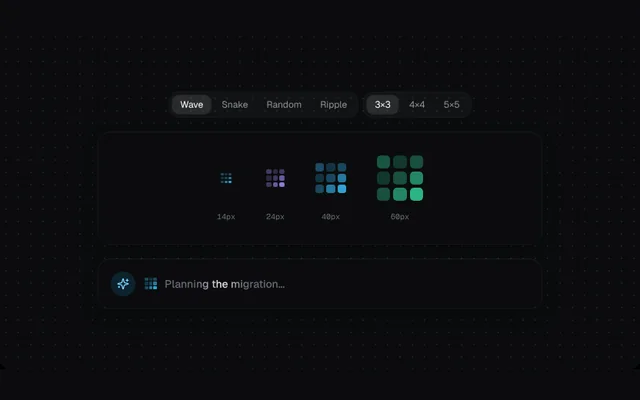
A tiny dot grid that flickers in waves, snakes, ripples or random sparks while the agent thinks.
Installation
01
Install with the shadcn CLI. The NiceUI theme comes along the first time.
$ npx shadcn@latest add https://niceui.dev/r/ai-grid-flicker.json02
Or copy the source below (2 files). Dependencies: lucide-react.
Source
components/niceui/ai/thinking/GridFlicker.tsx
import { useState } from 'react';
import { Pills, Showcase, Size, ThinkingLabel, TONES, usePrefersReducedMotion, useTick, type ThinkingState, type Tone } from './shared';

export type GridPattern = 'wave' | 'snake' | 'random' | 'ripple';

export type GridFlickerProps = {
  /** Overall size in px. */
  size?: number;
  /** Cells per side: 3, 4 or 5. */
  grid?: 3 | 4 | 5;
  pattern?: GridPattern;
  tone?: Tone;
  state?: ThinkingState;
  className?: string;
};

const hash = (n: number) => {
  const x = Math.sin(n * 127.1) * 43758.5453;
  return x - Math.floor(x);
};

/** Brightness 0..1 for cell (r, c) at frame t. */
function level(pattern: GridPattern, r: number, c: number, n: number, t: number) {
  if (pattern === 'wave') return 0.5 + 0.5 * Math.sin(t * 0.55 - (r + c) * 0.9);
  if (pattern === 'ripple') {
    const m = (n - 1) / 2;
    const d = Math.hypot(r - m, c - m);
    return 0.5 + 0.5 * Math.sin(t * 0.6 - d * 1.6);
  }
  if (pattern === 'snake') {
    const order = r % 2 === 0 ? r * n + c : r * n + (n - 1 - c);
    const head = t % (n * n);
    const dist = (head - order + n * n) % (n * n);
    return dist < 4 ? 1 - dist * 0.24 : 0.08;
  }
  return hash(r * 31 + c * 7 + Math.floor(t / 2) * 13) > 0.62 ? 1 : 0.12;
}

export function GridFlicker({ size = 20, grid = 3, pattern = 'wave', tone = 'sky', state = 'thinking', className }: GridFlickerProps) {
  const reduce = usePrefersReducedMotion();
  const t = useTick(state === 'thinking' && !reduce, 14);
  const c = TONES[tone];
  const gap = Math.max(1, size / (grid * 4.5));
  const cell = (size - gap * (grid - 1)) / grid;
  return (
    <span
      role="img"
      aria-label={state === 'thinking' ? 'Thinking' : state === 'done' ? 'Done' : 'Idle'}
      className={className}
      style={{ display: 'inline-grid', gridTemplateColumns: `repeat(${grid}, ${cell}px)`, gap, width: size, height: size }}
    >
      {Array.from({ length: grid * grid }, (_, i) => {
        const r = Math.floor(i / grid);
        const col = i % grid;
        const v = state === 'thinking' ? (reduce ? 0.35 + 0.4 * ((r + col) % 2) : level(pattern, r, col, grid, t)) : state === 'done' ? 0.9 : 0.18;
        return (
          <span
            key={i}
            style={{
              width: cell,
              height: cell,
              borderRadius: cell * 0.3,
              background: state === 'done' ? c.soft : c.main,
              opacity: 0.12 + v * 0.88,
              boxShadow: v > 0.75 && state === 'thinking' ? `0 0 ${Math.max(2, cell)}px ${c.main}aa` : 'none',
              transition: 'opacity 140ms linear, background 300ms',
            }}
          />
        );
      })}
    </span>
  );
}

const PATTERNS = ['wave', 'snake', 'random', 'ripple'] as const;
const GRIDS = ['3×3', '4×4', '5×5'] as const;

export function GridFlickerDemo() {
  const [pattern, setPattern] = useState<GridPattern>('wave');
  const [g, setG] = useState<(typeof GRIDS)[number]>('3×3');
  const grid = (Number(g[0]) as 3 | 4 | 5) || 3;
  return (
    <Showcase
      controls={
        <>
          <Pills label="Pattern" value={pattern} options={PATTERNS} onChange={setPattern} />
          <Pills label="Grid" value={g} options={GRIDS} onChange={setG} />
        </>
      }
      sizes={
        <>
          <Size px={14}><GridFlicker size={14} grid={grid} pattern={pattern} /></Size>
          <Size px={24}><GridFlicker size={24} grid={grid} pattern={pattern} tone="violet" /></Size>
          <Size px={40}><GridFlicker size={40} grid={grid} pattern={pattern} /></Size>
          <Size px={60}><GridFlicker size={60} grid={grid} pattern={pattern} tone="emerald" /></Size>
        </>
      }
      chat={
        <div className="flex items-center gap-2.5">
          <GridFlicker size={16} grid={grid} pattern={pattern} />
          <ThinkingLabel>Planning the migration…</ThinkingLabel>
        </div>
      }
    />
  );
}
components/niceui/ai/thinking/shared.tsx
import { useEffect, useState, type ReactNode } from 'react';
import { Sparkles } from 'lucide-react';
import { cn } from '@/lib/cn';

export type ThinkingState = 'idle' | 'thinking' | 'done';

export const TONES = {
  sky: { main: '#38bdf8', soft: '#7dd3fc', deep: '#0284c7' },
  violet: { main: '#a78bfa', soft: '#c4b5fd', deep: '#7c3aed' },
  emerald: { main: '#34d399', soft: '#6ee7b7', deep: '#059669' },
  amber: { main: '#fbbf24', soft: '#fcd34d', deep: '#d97706' },
  white: { main: '#e5e7eb', soft: '#f9fafb', deep: '#9ca3af' },
} as const;
export type Tone = keyof typeof TONES;

export function usePrefersReducedMotion() {
  const [reduce, setReduce] = useState(false);
  useEffect(() => {
    const mq = window.matchMedia('(prefers-reduced-motion: reduce)');
    setReduce(mq.matches);
    const on = () => setReduce(mq.matches);
    mq.addEventListener('change', on);
    return () => mq.removeEventListener('change', on);
  }, []);
  return reduce;
}

/** Ticks a frame counter at `fps` while active. */
export function useTick(active: boolean, fps = 12) {
  const [n, setN] = useState(0);
  useEffect(() => {
    if (!active) return;
    const id = window.setInterval(() => setN((v) => v + 1), 1000 / fps);
    return () => window.clearInterval(id);
  }, [active, fps]);
  return n;
}

export function Pills<T extends string>({ value, options, onChange, label }: { value: T; options: readonly T[]; onChange: (v: T) => void; label: string }) {
  return (
    <div role="radiogroup" aria-label={label} className="flex flex-wrap gap-1 rounded-xl bg-white/[0.03] p-1 ring-1 ring-white/5">
      {options.map((o) => (
        <button
          key={o}
          role="radio"
          aria-checked={value === o}
          onClick={() => onChange(o)}
          className={cn(
            'focus-ring rounded-lg px-2.5 py-1 text-xs capitalize transition-colors',
            value === o ? 'bg-white/10 text-ink-50 shadow-hairline' : 'text-ink-400 hover:text-ink-200',
          )}
        >
          {o}
        </button>
      ))}
    </div>
  );
}

/** Standard showcase: variant pills, a size ladder and an inline chat row. */
export function Showcase({ controls, sizes, chat, footer }: { controls: ReactNode; sizes: ReactNode; chat: ReactNode; footer?: ReactNode }) {
  return (
    <div className="mx-auto flex w-full max-w-xl flex-col gap-5">
      <div className="flex flex-wrap items-center justify-center gap-2">{controls}</div>
      <div className="flex min-h-[112px] flex-wrap items-center justify-center gap-x-10 gap-y-6 rounded-2xl bg-ink-900/80 px-6 py-7 shadow-card">{sizes}</div>
      <div className="flex items-start gap-3 rounded-2xl bg-ink-900 p-4 shadow-card">
        <span className="flex h-8 w-8 shrink-0 items-center justify-center rounded-full bg-brand-500/15 text-brand-300">
          <Sparkles className="h-4 w-4" />
        </span>
        <div className="min-w-0 flex-1 pt-1.5">{chat}</div>
      </div>
      {footer}
    </div>
  );
}

export function Size({ px, children }: { px: number; children: ReactNode }) {
  return (
    <div className="flex flex-col items-center gap-2.5">
      <div className="flex h-16 items-center justify-center">{children}</div>
      <span className="font-mono text-[10px] tabular-nums text-ink-500">{px}px</span>
    </div>
  );
}

export function ThinkingLabel({ children = 'Thinking…' }: { children?: ReactNode }) {
  return <span className="shimmer-text text-sm font-medium">{children}</span>;
}