Clarifying Question New
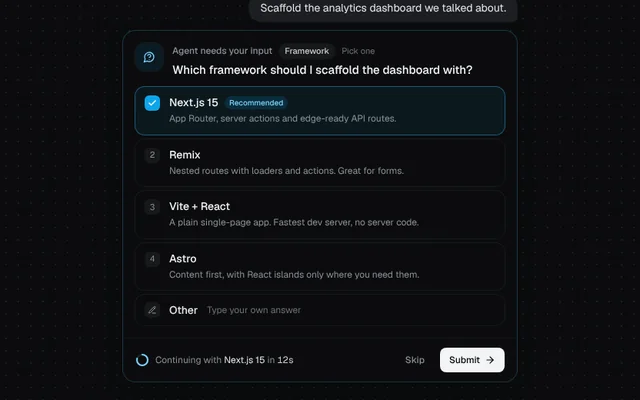
The agent stops to ask: options with descriptions, an “Other” answer, number-key shortcuts and an auto-continue countdown.
Installation
01
Install with the shadcn CLI. The NiceUI theme comes along the first time.
$ npx shadcn@latest add https://niceui.dev/r/ai-clarifying-question.json02
Or copy the source below. Dependencies: lucide-react.
Source
components/niceui/ai/ClarifyingQuestion.tsx
import { useEffect, useRef, useState, type KeyboardEvent } from 'react';
import { ArrowLeft, ArrowRight, Check, CheckCircle2, CornerDownLeft, Loader2, MessageCircleQuestion, PencilLine } from 'lucide-react';
import { cn } from '@/lib/cn';

export type QuestionOption = { id: string; label: string; description?: string; recommended?: boolean };
export type QuestionAnswer = { selected: string[]; other?: string; skipped?: boolean };

const reducedMotion = () => typeof window !== 'undefined' && window.matchMedia('(prefers-reduced-motion: reduce)').matches;
const EXPAND = 'grid transition-[grid-template-rows,opacity] duration-500 ease-smooth';
/** Collapsed panels stay in the DOM for the height animation, but must not take focus. */
const inert = (on: boolean) => (on ? { inert: '' } : {}) as object;

/* ——— Option list shared by the single question and the stepper ——— */

type OptionListProps = {
  options: QuestionOption[];
  multi: boolean;
  selected: string[];
  onToggle: (id: string) => void;
  allowOther: boolean;
  otherOn: boolean;
  other: string;
  onOtherOn: (on: boolean) => void;
  onOther: (text: string) => void;
};

function OptionList({ options, multi, selected, onToggle, allowOther, otherOn, other, onOtherOn, onOther }: OptionListProps) {
  const input = useRef<HTMLInputElement>(null);
  useEffect(() => {
    if (otherOn) input.current?.focus({ preventScroll: true });
  }, [otherOn]);

  return (
    <div role={multi ? 'group' : 'radiogroup'} className="space-y-1.5">
      {options.map((o, i) => {
        const on = selected.includes(o.id);
        return (
          <button
            key={o.id}
            type="button"
            role={multi ? 'checkbox' : 'radio'}
            aria-checked={on}
            onClick={() => onToggle(o.id)}
            className={cn(
              'focus-ring group flex w-full items-start gap-3 rounded-xl px-3 py-2.5 text-left transition-all duration-200 active:scale-[0.99]',
              on ? 'bg-brand-500/[0.08] shadow-[0_0_0_1px_rgba(56,189,248,0.45)]' : 'shadow-hairline hover:bg-white/[0.03]',
            )}
          >
            <span
              className={cn(
                'mt-px flex h-5 w-5 shrink-0 items-center justify-center rounded-md font-mono text-[11px] transition-all duration-300 ease-spring',
                on ? 'bg-brand-500 text-white' : 'bg-white/5 text-ink-400 group-hover:text-ink-200',
              )}
            >
              {on ? <Check className="h-3 w-3 animate-scale-in" strokeWidth={3} /> : i + 1}
            </span>
            <span className="min-w-0 flex-1">
              <span className="flex flex-wrap items-center gap-x-2 gap-y-1">
                <span className="text-sm font-medium text-ink-50">{o.label}</span>
                {o.recommended && <span className="rounded-full bg-brand-500/15 px-1.5 py-px text-[10px] font-medium text-brand-300">Recommended</span>}
              </span>
              {o.description && <span className="mt-0.5 block text-xs leading-relaxed text-ink-400">{o.description}</span>}
            </span>
          </button>
        );
      })}
      {allowOther && (
        <div className={cn('rounded-xl transition-all duration-200', otherOn ? 'bg-brand-500/[0.08] shadow-[0_0_0_1px_rgba(56,189,248,0.45)]' : 'shadow-hairline hover:bg-white/[0.03]')}>
          <button type="button" role={multi ? 'checkbox' : 'radio'} aria-checked={otherOn} onClick={() => onOtherOn(!otherOn)} className="focus-ring flex w-full items-center gap-3 rounded-xl px-3 py-2.5 text-left">
            <span className={cn('flex h-5 w-5 shrink-0 items-center justify-center rounded-md transition-colors', otherOn ? 'bg-brand-500 text-white' : 'bg-white/5 text-ink-400')}>
              <PencilLine className="h-3 w-3" />
            </span>
            <span className="text-sm font-medium text-ink-100">Other</span>
            <span className="truncate text-xs text-ink-500">Type your own answer</span>
          </button>
          <div className={cn(EXPAND, otherOn ? 'grid-rows-[1fr] opacity-100' : 'grid-rows-[0fr] opacity-0')}>
            <div className="overflow-hidden">
              <input
                ref={input}
                value={other}
                tabIndex={otherOn ? 0 : -1}
                onChange={(e) => onOther(e.target.value)}
                placeholder="e.g. SvelteKit, we already use it elsewhere"
                aria-label="Your own answer"
                className="mx-3 mb-3 block w-[calc(100%-1.5rem)] rounded-lg bg-ink-950/70 px-3 py-2 text-sm text-ink-50 shadow-hairline outline-none placeholder:text-ink-500 focus:shadow-[0_0_0_1px_rgba(56,189,248,0.5)]"
              />
            </div>
          </div>
        </div>
      )}
    </div>
  );
}

/** Selection state for one question; single-select clears the others, "Other" included. */
function useChoice(multi: boolean, initial: string[] = []) {
  const [selected, setSelected] = useState<string[]>(initial);
  const [otherOn, setOtherOn] = useState(false);
  const [other, setOther] = useState('');
  const toggle = (id: string) => {
    setSelected((s) => (multi ? (s.includes(id) ? s.filter((x) => x !== id) : [...s, id]) : s.includes(id) ? [] : [id]));
    if (!multi) setOtherOn(false);
  };
  const setOtherOnSafe = (on: boolean) => {
    setOtherOn(on);
    if (on && !multi) setSelected([]);
  };
  const ready = selected.length > 0 || (otherOn && other.trim().length > 0);
  const answer: QuestionAnswer = { selected, other: otherOn && other.trim() ? other.trim() : undefined };
  return { selected, otherOn, other, toggle, setOtherOn: setOtherOnSafe, setOther, ready, answer, setSelected };
}

function Countdown({ left, total }: { left: number; total: number }) {
  const r = 7;
  const c = 2 * Math.PI * r;
  return (
    <svg viewBox="0 0 18 18" className="h-[18px] w-[18px] -rotate-90" aria-hidden>
      <circle cx="9" cy="9" r={r} fill="none" stroke="currentColor" strokeOpacity={0.15} strokeWidth={2} />
      <circle cx="9" cy="9" r={r} fill="none" stroke="currentColor" strokeWidth={2} strokeLinecap="round" strokeDasharray={c} strokeDashoffset={c * (1 - left / total)} />
    </svg>
  );
}

function AnswerChips({ options, answer }: { options: QuestionOption[]; answer: QuestionAnswer }) {
  if (answer.skipped) return <span className="text-xs text-ink-500">Skipped · the agent will use its best judgement</span>;
  return (
    <span className="flex flex-wrap gap-1.5">
      {answer.selected.map((id) => (
        <span key={id} className="rounded-md bg-brand-500/10 px-2 py-0.5 text-xs font-medium text-brand-200">
          {options.find((o) => o.id === id)?.label ?? id}
        </span>
      ))}
      {answer.other && <span className="rounded-md bg-white/5 px-2 py-0.5 text-xs text-ink-200">“{answer.other}”</span>}
    </span>
  );
}

/* ——— Single question ——— */

export type ClarifyingQuestionProps = {
  question: string;
  /** Short topic label shown as a chip, e.g. "Framework". */
  header?: string;
  options: QuestionOption[];
  multiSelect?: boolean;
  allowOther?: boolean;
  /** Seconds before the recommended option is submitted automatically. Any interaction cancels it. */
  autoContinue?: number;
  onSubmit?: (answer: QuestionAnswer) => void;
  className?: string;
};

export function ClarifyingQuestion({ question, header, options, multiSelect = false, allowOther = true, autoContinue, onSubmit, className }: ClarifyingQuestionProps) {
  const recommended = options.find((o) => o.recommended);
  const choice = useChoice(multiSelect, autoContinue && recommended ? [recommended.id] : []);
  const [answered, setAnswered] = useState<QuestionAnswer | null>(null);
  const total = (autoContinue ?? 0) * 1000;
  const [left, setLeft] = useState(total);
  const [counting, setCounting] = useState(!!autoContinue && !!recommended);

  useEffect(() => {
    if (!counting || answered) return;
    const id = window.setInterval(() => setLeft((l) => Math.max(0, l - 100)), 100);
    return () => window.clearInterval(id);
  }, [counting, answered]);

  const submit = (a: QuestionAnswer) => {
    setCounting(false);
    setAnswered(a);
    onSubmit?.(a);
  };

  useEffect(() => {
    if (counting && left === 0 && recommended && !answered) submit({ selected: [recommended.id] });
    // eslint-disable-next-line react-hooks/exhaustive-deps
  }, [left, counting]);

  const touch = () => counting && setCounting(false);

  const onKey = (e: KeyboardEvent<HTMLDivElement>) => {
    if (answered) return;
    touch();
    const target = e.target as HTMLElement;
    if (target.tagName === 'INPUT') {
      if (e.key === 'Enter' && choice.ready) {
        e.preventDefault();
        submit(choice.answer);
      }
      return;
    }
    const n = Number(e.key);
    if (Number.isInteger(n) && n >= 1 && n <= options.length) {
      e.preventDefault();
      choice.toggle(options[n - 1].id);
    } else if (e.key === 'Enter') {
      e.preventDefault();
      if (choice.ready) submit(choice.answer);
    }
  };

  const pick = recommended?.label ?? '';

  return (
    <div
      onKeyDown={onKey}
      onPointerDown={touch}
      className={cn(
        'w-full overflow-hidden rounded-2xl bg-ink-900 transition-shadow duration-500',
        answered ? 'shadow-card' : 'shadow-[0_0_0_1px_rgba(56,189,248,0.22),0_0_0_1px_rgba(255,255,255,0.04),0_8px_24px_-8px_rgba(0,0,0,0.5)]',
        className,
      )}
    >
      <div className={cn(EXPAND, answered ? 'grid-rows-[0fr] opacity-0' : 'grid-rows-[1fr] opacity-100')}>
        <div className="overflow-hidden" {...inert(!!answered)}>
          <div className="flex items-start gap-3 p-4 pb-3">
            <span className="flex h-9 w-9 shrink-0 items-center justify-center rounded-xl bg-brand-500/10 text-brand-300 shadow-hairline">
              <MessageCircleQuestion className="h-4 w-4" />
            </span>
            <div className="min-w-0 flex-1">
              <div className="flex flex-wrap items-center gap-2">
                <span className="text-xs font-medium text-ink-400">Agent needs your input</span>
                {header && <span className="rounded-full bg-white/5 px-2 py-0.5 text-[11px] font-medium text-ink-200">{header}</span>}
                <span className="text-[11px] text-ink-500">{multiSelect ? 'Pick any' : 'Pick one'}</span>
              </div>
              <p className="mt-1 text-[15px] font-medium leading-snug text-ink-50">{question}</p>
            </div>
          </div>
          <div className="px-4">
            <OptionList
              options={options}
              multi={multiSelect}
              selected={choice.selected}
              onToggle={(id) => {
                touch();
                choice.toggle(id);
              }}
              allowOther={allowOther}
              otherOn={choice.otherOn}
              other={choice.other}
              onOtherOn={(on) => {
                touch();
                choice.setOtherOn(on);
              }}
              onOther={choice.setOther}
            />
          </div>
          <div className="mt-4 flex flex-wrap items-center justify-between gap-3 border-t border-white/5 px-4 py-3">
            {counting ? (
              <span className="flex min-w-0 items-center gap-2 text-xs text-ink-400">
                <span className="text-brand-300">
                  <Countdown left={left} total={total} />
                </span>
                <span className="truncate">
                  Continuing with <span className="text-ink-100">{pick}</span> in <span className="font-mono tabular-nums text-ink-200">{Math.ceil(left / 1000)}s</span>
                </span>
              </span>
            ) : (
              <span className="hidden items-center gap-1.5 text-[11px] text-ink-500 sm:flex">
                <kbd className="rounded bg-white/5 px-1 font-mono">1–{options.length}</kbd> choose
                <kbd className="ml-1.5 flex items-center rounded bg-white/5 px-1 py-px">
                  <CornerDownLeft className="h-2.5 w-2.5" />
                </kbd>
                submit
              </span>
            )}
            <div className="ml-auto flex gap-2">
              <button
                type="button"
                onClick={() => submit({ selected: [], skipped: true })}
                className="focus-ring flex h-8 items-center rounded-lg px-3 text-xs font-medium text-ink-400 transition-colors hover:bg-white/5 hover:text-ink-100"
              >
                Skip
              </button>
              <button
                type="button"
                disabled={!choice.ready}
                onClick={() => submit(choice.answer)}
                className="focus-ring flex h-8 items-center gap-1.5 rounded-lg bg-ink-50 px-3 text-xs font-medium text-ink-950 transition-all hover:bg-white active:scale-95 disabled:cursor-not-allowed disabled:bg-ink-800 disabled:text-ink-500"
              >
                Submit <ArrowRight className="h-3.5 w-3.5" />
              </button>
            </div>
          </div>
        </div>
      </div>
      <div className={cn(EXPAND, answered ? 'grid-rows-[1fr] opacity-100' : 'grid-rows-[0fr] opacity-0')}>
        <div className="overflow-hidden" {...inert(!answered)}>
          <div className="flex items-start gap-3 p-4">
            <CheckCircle2 className="mt-0.5 h-4 w-4 shrink-0 text-emerald-400" />
            <div className="min-w-0 flex-1 space-y-1.5">
              <p className="truncate text-xs text-ink-500">{question}</p>
              {answered && <AnswerChips options={options} answer={answered} />}
            </div>
            <button
              type="button"
              onClick={() => setAnswered(null)}
              className="focus-ring shrink-0 rounded-md px-2 py-1 text-xs text-ink-500 transition-colors hover:bg-white/5 hover:text-ink-100"
            >
              Edit
            </button>
          </div>
        </div>
      </div>
    </div>
  );
}

/* ——— Several questions, one at a time ——— */

export type QuestionStep = { id: string; header: string; question: string; options: QuestionOption[]; multiSelect?: boolean };

export type ClarifyingQuestionsProps = {
  steps: QuestionStep[];
  title?: string;
  onComplete?: (answers: Record<string, QuestionAnswer>) => void;
  className?: string;
};

function StepBody({ step, initial, onChange }: { step: QuestionStep; initial?: QuestionAnswer; onChange: (a: QuestionAnswer, ready: boolean) => void }) {
  const choice = useChoice(!!step.multiSelect, initial?.selected ?? []);
  useEffect(() => {
    if (initial?.other) {
      choice.setOtherOn(true);
      choice.setOther(initial.other);
    }
    // eslint-disable-next-line react-hooks/exhaustive-deps
  }, []);
  useEffect(() => onChange(choice.answer, choice.ready), [choice.selected, choice.otherOn, choice.other]); // eslint-disable-line react-hooks/exhaustive-deps
  return (
    <div
      onKeyDown={(e) => {
        const n = Number(e.key);
        if ((e.target as HTMLElement).tagName !== 'INPUT' && Number.isInteger(n) && n >= 1 && n <= step.options.length) {
          e.preventDefault();
          choice.toggle(step.options[n - 1].id);
        }
      }}
    >
      <div className="mb-3 flex flex-wrap items-center gap-2">
        <span className="rounded-full bg-white/5 px-2 py-0.5 text-[11px] font-medium text-ink-200">{step.header}</span>
        <span className="text-[11px] text-ink-500">{step.multiSelect ? 'Pick any' : 'Pick one'}</span>
      </div>
      <p className="mb-3 text-[15px] font-medium leading-snug text-ink-50">{step.question}</p>
      <OptionList
        options={step.options}
        multi={!!step.multiSelect}
        selected={choice.selected}
        onToggle={choice.toggle}
        allowOther
        otherOn={choice.otherOn}
        other={choice.other}
        onOtherOn={choice.setOtherOn}
        onOther={choice.setOther}
      />
    </div>
  );
}

export function ClarifyingQuestions({ steps, title = 'A few questions before I start', onComplete, className }: ClarifyingQuestionsProps) {
  const [index, setIndex] = useState(0);
  const [answers, setAnswers] = useState<Record<string, QuestionAnswer>>({});
  const [ready, setReady] = useState<Record<string, boolean>>({});
  const [done, setDone] = useState(false);
  const step = steps[index];
  const last = index === steps.length - 1;

  const next = () => {
    if (!ready[step.id]) return;
    if (last) {
      setDone(true);
      onComplete?.(answers);
    } else setIndex((i) => i + 1);
  };

  return (
    <div className={cn('w-full overflow-hidden rounded-2xl bg-ink-900 shadow-card', className)}>
      <div className="flex items-center gap-3 border-b border-white/5 px-4 py-3">
        <span className="flex h-7 w-7 shrink-0 items-center justify-center rounded-lg bg-brand-500/10 text-brand-300">
          <MessageCircleQuestion className="h-3.5 w-3.5" />
        </span>
        <span className="min-w-0 flex-1 truncate text-sm font-medium text-ink-100">{done ? 'Got it, thanks' : title}</span>
        <span className="font-mono text-xs tabular-nums text-ink-500">
          {done ? steps.length : index + 1} / {steps.length}
        </span>
      </div>
      <div className="flex gap-1 px-4 pt-3" aria-hidden>
        {steps.map((s, i) => (
          <span key={s.id} className="h-1 flex-1 overflow-hidden rounded-full bg-white/5">
            <span className={cn('block h-full rounded-full bg-brand-400 transition-all duration-500 ease-smooth', done || i < index ? 'w-full' : i === index ? 'w-1/2' : 'w-0')} />
          </span>
        ))}
      </div>

      {!done ? (
        <div
          onKeyDown={(e) => {
            const t = e.target as HTMLElement;
            if (e.key === 'Enter' && (t.tagName === 'INPUT' || t.getAttribute('role') === 'radio' || t.getAttribute('role') === 'checkbox')) {
              e.preventDefault();
              next();
            }
          }}
        >
          <div key={step.id} className={cn('p-4', !reducedMotion() && 'animate-fade-up')}>
            <StepBody
              step={step}
              initial={answers[step.id]}
              onChange={(a, ok) => {
                setAnswers((all) => ({ ...all, [step.id]: a }));
                setReady((r) => ({ ...r, [step.id]: ok }));
              }}
            />
          </div>
          <div className="flex items-center justify-between gap-2 border-t border-white/5 px-4 py-3">
            <button
              type="button"
              disabled={index === 0}
              onClick={() => setIndex((i) => i - 1)}
              className="focus-ring flex h-8 items-center gap-1.5 rounded-lg px-2.5 text-xs font-medium text-ink-400 transition-colors hover:bg-white/5 hover:text-ink-100 disabled:pointer-events-none disabled:opacity-30"
            >
              <ArrowLeft className="h-3.5 w-3.5" /> Back
            </button>
            <button
              type="button"
              disabled={!ready[step.id]}
              onClick={next}
              className="focus-ring flex h-8 items-center gap-1.5 rounded-lg bg-ink-50 px-3 text-xs font-medium text-ink-950 transition-all hover:bg-white active:scale-95 disabled:cursor-not-allowed disabled:bg-ink-800 disabled:text-ink-500"
            >
              {last ? 'Submit answers' : 'Next'} {last ? <Check className="h-3.5 w-3.5" /> : <ArrowRight className="h-3.5 w-3.5" />}
            </button>
          </div>
        </div>
      ) : (
        <div className={cn('space-y-1 p-2', !reducedMotion() && 'animate-fade-in')}>
          {steps.map((s, i) => (
            <div key={s.id} className="flex items-start gap-3 rounded-xl px-2 py-2.5 transition-colors hover:bg-white/[0.02]">
              <CheckCircle2 className="mt-0.5 h-4 w-4 shrink-0 text-emerald-400" />
              <div className="min-w-0 flex-1 space-y-1.5">
                <p className="truncate text-xs text-ink-500">{s.question}</p>
                <AnswerChips options={s.options} answer={answers[s.id] ?? { selected: [] }} />
              </div>
              <button
                type="button"
                onClick={() => {
                  setDone(false);
                  setIndex(i);
                }}
                className="focus-ring shrink-0 rounded-md px-2 py-1 text-xs text-ink-500 transition-colors hover:bg-white/5 hover:text-ink-100"
              >
                Edit
              </button>
            </div>
          ))}
        </div>
      )}
    </div>
  );
}

/* ——— Demos ——— */

const FRAMEWORKS: QuestionOption[] = [
  { id: 'next', label: 'Next.js 15', description: 'App Router, server actions and edge-ready API routes.', recommended: true },
  { id: 'remix', label: 'Remix', description: 'Nested routes with loaders and actions. Great for forms.' },
  { id: 'vite', label: 'Vite + React', description: 'A plain single-page app. Fastest dev server, no server code.' },
  { id: 'astro', label: 'Astro', description: 'Content first, with React islands only where you need them.' },
];

export function ClarifyingQuestionDemo() {
  const [answer, setAnswer] = useState<QuestionAnswer | null>(null);
  const [auto] = useState(() => (reducedMotion() ? undefined : 15));
  const label = answer?.other ?? FRAMEWORKS.find((f) => f.id === answer?.selected[0])?.label;
  return (
    <div className="mx-auto flex w-full max-w-lg flex-col gap-3">
      <p className="self-end rounded-2xl rounded-br-md bg-ink-800 px-3.5 py-2 text-sm text-ink-100 shadow-hairline">Scaffold the analytics dashboard we talked about.</p>
      <ClarifyingQuestion header="Framework" question="Which framework should I scaffold the dashboard with?" options={FRAMEWORKS} autoContinue={auto} onSubmit={setAnswer} />
      <div className="h-5">
        {answer && (
          <p key={label} className="flex animate-fade-up items-center gap-2 text-xs text-ink-400">
            {answer.skipped ? (
              <>Okay, I’ll pick something sensible.</>
            ) : (
              <>
                <Loader2 className="h-3.5 w-3.5 animate-spin text-brand-400" />
                <span className="shimmer-text">Scaffolding with {label}…</span>
              </>
            )}
          </p>
        )}
      </div>
    </div>
  );
}

const BRIEF: QuestionStep[] = [
  {
    id: 'audience',
    header: 'Audience',
    question: 'Who is this landing page for?',
    options: [
      { id: 'dev', label: 'Developers', description: 'Code samples, docs links and a CLI install line.' },
      { id: 'design', label: 'Designers', description: 'Big visuals, motion and a gallery of work.' },
      { id: 'founders', label: 'Founders', description: 'Outcomes, pricing and social proof up front.' },
      { id: 'enterprise', label: 'Enterprise buyers', description: 'Security, compliance and a sales contact.' },
    ],
  },
  {
    id: 'sections',
    header: 'Sections',
    question: 'Which sections should I include?',
    multiSelect: true,
    options: [
      { id: 'hero', label: 'Hero with product shot' },
      { id: 'pricing', label: 'Pricing table' },
      { id: 'logos', label: 'Customer logos' },
      { id: 'faq', label: 'FAQ' },
    ],
  },
  {
    id: 'tone',
    header: 'Tone',
    question: 'How should it feel?',
    options: [
      { id: 'calm', label: 'Calm and editorial', description: 'Serif accents, lots of whitespace.' },
      { id: 'bold', label: 'Bold and loud', description: 'Huge type and high-contrast color.' },
      { id: 'playful', label: 'Playful', description: 'Rounded shapes and springy motion.' },
      { id: 'technical', label: 'Technical', description: 'Mono type, grids and diagrams.' },
    ],
  },
];

export function ClarifyingQuestionsDemo() {
  return (
    <div className="mx-auto w-full max-w-lg">
      <ClarifyingQuestions steps={BRIEF} />
    </div>
  );
}