Scroll Animation
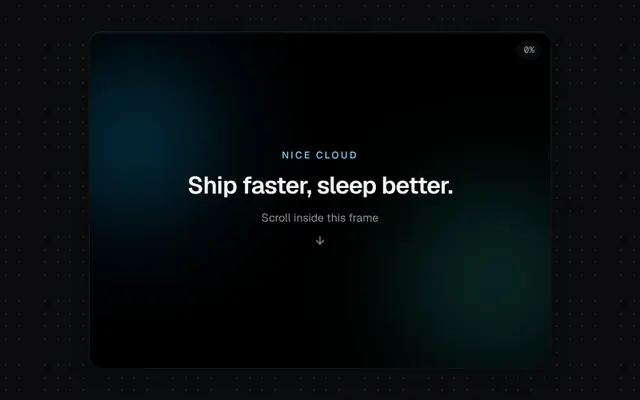
Scroll-linked progress, parallax layers and reveal-on-scroll, scoped to any scroll container.
Installation
01
Install with the shadcn CLI. The NiceUI theme comes along the first time.
$ npx shadcn@latest add https://niceui.dev/r/components-scroll-animation.json02
Or copy the source below. Dependencies: lucide-react.
Source
components/niceui/ui/motion/ScrollAnimation.tsx
import { useEffect, useRef, useState, type ReactNode, type RefObject } from 'react';
import { ArrowDown, BarChart3, Layers, Sparkles, Zap } from 'lucide-react';
import { cn } from '@/lib/cn';

/** Reveals children when they intersect the given scroll root. */
export function Reveal({ children, root, delay = 0, className }: { children: ReactNode; root?: RefObject<HTMLElement>; delay?: number; className?: string }) {
  const ref = useRef<HTMLDivElement>(null);
  const [shown, setShown] = useState(false);
  useEffect(() => {
    const el = ref.current;
    if (!el) return;
    const io = new IntersectionObserver(([e]) => setShown(e.isIntersecting), { root: root?.current ?? null, threshold: 0.2, rootMargin: '0px 0px -8% 0px' });
    io.observe(el);
    return () => io.disconnect();
  }, [root]);
  return (
    <div
      ref={ref}
      style={{ transitionDelay: shown ? `${delay}ms` : '0ms' }}
      className={cn(
        'transition-all duration-700 ease-smooth',
        shown ? 'translate-y-0 scale-100 opacity-100 blur-0' : 'translate-y-8 scale-[0.98] opacity-0 blur-[3px]',
        className,
      )}
    >
      {children}
    </div>
  );
}

/** Tracks scroll progress (0..1) and scrollTop of a container. */
export function useScrollProgress(ref: RefObject<HTMLElement>) {
  const [state, setState] = useState({ progress: 0, top: 0 });
  useEffect(() => {
    const el = ref.current;
    if (!el) return;
    let raf = 0;
    const onScroll = () => {
      cancelAnimationFrame(raf);
      raf = requestAnimationFrame(() => {
        const max = el.scrollHeight - el.clientHeight;
        setState({ progress: max > 0 ? el.scrollTop / max : 0, top: el.scrollTop });
      });
    };
    el.addEventListener('scroll', onScroll, { passive: true });
    return () => {
      el.removeEventListener('scroll', onScroll);
      cancelAnimationFrame(raf);
    };
  }, [ref]);
  return state;
}

const FEATURES = [
  { icon: Zap, title: 'Instant previews', body: 'Every push gets a live URL in under 20 seconds.', tint: 'text-amber-300 bg-amber-500/10' },
  { icon: Layers, title: 'Branch databases', body: 'Isolated Postgres copies for each pull request.', tint: 'text-brand-300 bg-brand-500/10' },
  { icon: BarChart3, title: 'Real-user metrics', body: 'Core Web Vitals from actual visitors, not lab runs.', tint: 'text-emerald-300 bg-emerald-500/10' },
  { icon: Sparkles, title: 'AI code review', body: 'Catches regressions before your teammates do.', tint: 'text-sky-300 bg-sky-500/10' },
];

export function ScrollAnimationDemo() {
  const scroller = useRef<HTMLDivElement>(null);
  const { progress, top } = useScrollProgress(scroller);

  return (
    <div className="relative mx-auto h-[420px] w-full max-w-xl overflow-hidden rounded-2xl bg-ink-950 shadow-card">
      <div className="absolute inset-x-0 top-0 z-20 h-0.5 bg-white/5">
        <div className="h-full origin-left bg-gradient-to-r from-brand-500 to-teal-400" style={{ transform: `scaleX(${progress})` }} />
      </div>
      <div className="absolute right-3 top-3 z-20 rounded-full bg-ink-900/80 px-2 py-0.5 font-mono text-[11px] text-ink-300 shadow-hairline backdrop-blur">
        {Math.round(progress * 100)}%
      </div>
      <div ref={scroller} className="h-full overflow-y-auto overscroll-contain">
        <section className="relative flex h-[420px] flex-col items-center justify-center overflow-hidden text-center">
          <div
            className="absolute -left-10 top-10 h-48 w-48 rounded-full bg-brand-500/30 blur-3xl"
            style={{ transform: `translateY(${top * 0.5}px)` }}
          />
          <div
            className="absolute -right-10 bottom-0 h-56 w-56 rounded-full bg-teal-400/20 blur-3xl"
            style={{ transform: `translateY(${top * -0.3}px)` }}
          />
          <div style={{ transform: `translateY(${top * 0.35}px)`, opacity: Math.max(0, 1 - top / 300) }} className="relative px-6">
            <p className="text-xs font-medium uppercase tracking-[0.2em] text-brand-300">Nice Cloud</p>
            <h3 className="mt-3 text-3xl font-semibold tracking-tight text-ink-50">Ship faster, sleep better.</h3>
            <p className="mt-3 text-sm text-ink-400">Scroll inside this frame</p>
            <ArrowDown className="mx-auto mt-4 h-4 w-4 animate-float text-ink-400" />
          </div>
        </section>
        <section className="space-y-3 px-6 pb-10">
          {FEATURES.map((f, i) => (
            <Reveal key={f.title} root={scroller} delay={i % 2 ? 60 : 0}>
              <div className="flex items-start gap-4 rounded-2xl bg-ink-900 p-5 shadow-card">
                <span className={cn('flex h-10 w-10 shrink-0 items-center justify-center rounded-xl', f.tint)}>
                  <f.icon className="h-5 w-5" />
                </span>
                <div>
                  <p className="font-medium text-ink-50">{f.title}</p>
                  <p className="mt-1 text-sm text-ink-400">{f.body}</p>
                </div>
              </div>
            </Reveal>
          ))}
          <Reveal root={scroller}>
            <div className="grid grid-cols-3 gap-3 pt-4">
              {[['99.99%', 'Uptime'], ['18 ms', 'p50 latency'], ['42', 'Regions']].map(([v, l]) => (
                <div key={l} className="rounded-xl bg-ink-900 p-4 text-center shadow-hairline">
                  <p className="text-xl font-semibold text-ink-50">{v}</p>
                  <p className="mt-1 text-xs text-ink-400">{l}</p>
                </div>
              ))}
            </div>
          </Reveal>
          <Reveal root={scroller}>
            <p className="pt-8 text-center text-sm text-ink-400">That’s the end — scroll back up to replay.</p>
          </Reveal>
        </section>
      </div>
    </div>
  );
}