Measure Bar New
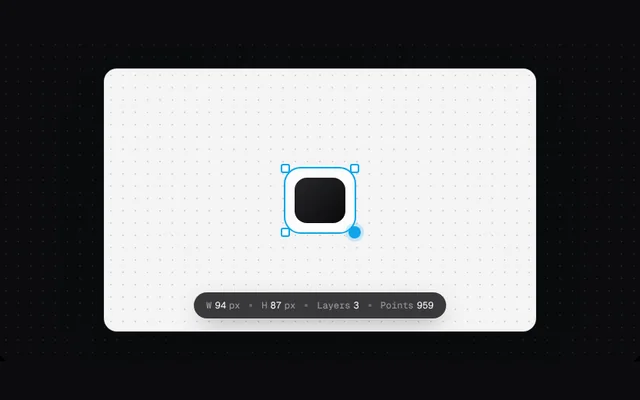
A dark translucent chip bar of live measurements whose numbers tween when they change. Drag the handle (or use the arrow keys on it) to resize the shape.
Installation
01
Install with the shadcn CLI. The NiceUI theme comes along the first time.
$ npx shadcn@latest add https://niceui.dev/r/design-measure-bar.json02
Or copy the source below (2 files). Dependencies: none.
Source
components/niceui/design/MeasureBar.tsx
import { useEffect, useRef, useState } from 'react';
import { cn } from '@/lib/cn';
import { LightFrame } from './shared';

export type Measure = { label: string; value: number; unit?: string; decimals?: number };

function useTween(target: number, ms = 500) {
  const [v, setV] = useState(target);
  const from = useRef(target);
  useEffect(() => {
    const start = performance.now();
    const a = from.current;
    let raf = 0;
    const tick = (t: number) => {
      const k = Math.min(1, Math.max(0, (t - start) / ms));
      const e = 1 - Math.pow(1 - k, 3);
      const nv = a + (target - a) * e;
      from.current = nv;
      setV(nv);
      if (k < 1) raf = requestAnimationFrame(tick);
    };
    raf = requestAnimationFrame(tick);
    return () => cancelAnimationFrame(raf);
  }, [target, ms]);
  return v;
}

function Cell({ m }: { m: Measure }) {
  const v = useTween(m.value);
  return (
    <span className="flex items-baseline gap-1 whitespace-nowrap">
      <span className="text-white/50">{m.label}</span>
      <span className="tabular-nums text-white">{v.toLocaleString('en-US', { minimumFractionDigits: m.decimals ?? 0, maximumFractionDigits: m.decimals ?? 0 })}</span>
      {m.unit && <span className="text-white/50">{m.unit}</span>}
    </span>
  );
}

/** A dark translucent chip bar of live measurements; values tween when they change. */
export function MeasureBar({ items, className }: { items: Measure[]; className?: string }) {
  return (
    <div role="status" aria-live="polite" className={cn('inline-flex max-w-full flex-wrap items-center justify-center gap-x-3 gap-y-1 rounded-full bg-zinc-900/85 px-4 py-2 font-mono text-[12px] shadow-[0_10px_30px_-10px_rgba(0,0,0,0.5)] ring-1 ring-white/10 backdrop-blur', className)}>
      {items.map((m, i) => (
        <span key={m.label} className="flex items-center gap-3">
          {i > 0 && <span className="h-1 w-1 rounded-full bg-white/25" />}
          <Cell m={m} />
        </span>
      ))}
    </div>
  );
}

export function MeasureBarDemo() {
  const [s, setS] = useState({ w: 120, h: 120, layers: 3, pts: 1284 });
  const [drag, setDrag] = useState(false);
  const box = useRef<HTMLDivElement>(null);
  useEffect(() => {
    if (drag) return;
    const t = setInterval(() => {
      const w = 80 + Math.round(Math.random() * 120);
      const h = 70 + Math.round(Math.random() * 110);
      setS((p) => ({ w, h, layers: p.layers, pts: Math.round((w + h) * 5.3) }));
    }, 2200);
    return () => clearInterval(t);
  }, [drag]);
  return (
    <LightFrame className="mx-auto max-w-[560px]" bare>
      <div className="relative flex h-[340px] flex-col items-center justify-center overflow-hidden rounded-2xl bg-[#f4f4f5]" style={{ backgroundImage: 'radial-gradient(#d4d4d8 1px, transparent 1px)', backgroundSize: '16px 16px' }}>
        <div
          ref={box}
          className="relative rounded-[22px] border-2 border-sky-500 bg-white/70 transition-[width,height] duration-500 ease-smooth"
          style={{ width: s.w, height: s.h }}
        >
          <div className="absolute inset-3 rounded-2xl bg-gradient-to-br from-zinc-800 to-zinc-950" />
          {[['-left-1.5 -top-1.5'], ['-right-1.5 -top-1.5'], ['-left-1.5 -bottom-1.5'], ['-bottom-1.5 -right-1.5']].map(([p]) => (
            <span key={p} className={cn('absolute h-3 w-3 rounded-[3px] border-2 border-sky-500 bg-white', p)} />
          ))}
          <span
            role="slider"
            tabIndex={0}
            aria-label="Resize shape"
            aria-valuenow={s.w}
            onPointerDown={(e) => {
              (e.currentTarget as HTMLElement).setPointerCapture(e.pointerId);
              setDrag(true);
            }}
            onPointerMove={(e) => {
              if (!drag || !box.current) return;
              const r = box.current.getBoundingClientRect();
              const w = Math.round(Math.min(220, Math.max(48, e.clientX - r.left)));
              const h = Math.round(Math.min(200, Math.max(48, e.clientY - r.top)));
              setS((p) => ({ ...p, w, h, pts: Math.round((w + h) * 5.3) }));
            }}
            onPointerUp={() => setDrag(false)}
            onKeyDown={(e) => {
              const d = e.shiftKey ? 10 : 2;
              if (e.key === 'ArrowRight') setS((p) => ({ ...p, w: Math.min(220, p.w + d) }));
              if (e.key === 'ArrowLeft') setS((p) => ({ ...p, w: Math.max(48, p.w - d) }));
              if (e.key === 'ArrowDown') setS((p) => ({ ...p, h: Math.min(200, p.h + d) }));
              if (e.key === 'ArrowUp') setS((p) => ({ ...p, h: Math.max(48, p.h - d) }));
            }}
            className="absolute -bottom-2 -right-2 h-4 w-4 cursor-nwse-resize rounded-full bg-sky-500 outline-none ring-4 ring-sky-500/20 focus-visible:ring-sky-500/50"
          />
        </div>
        <div className="absolute inset-x-3 bottom-4 flex justify-center">
          <MeasureBar
            items={[
              { label: 'W', value: s.w, unit: 'px' },
              { label: 'H', value: s.h, unit: 'px' },
              { label: 'Layers', value: s.layers },
              { label: 'Points', value: s.pts },
            ]}
          />
        </div>
      </div>
    </LightFrame>
  );
}
components/niceui/design/shared.tsx
import type { ReactNode } from 'react';
import { cn } from '@/lib/cn';

/** A light surface for demos, since the doc stage itself is dark. */
export function LightFrame({ children, className, bare }: { children: ReactNode; className?: string; bare?: boolean }) {
  return (
    <div className={cn('w-full rounded-2xl font-sans', bare ? 'overflow-hidden bg-[#f4f4f5]' : 'bg-[#fafafa] p-4 sm:p-6', ' text-[13px] text-zinc-800 shadow-[0_1px_0_rgba(255,255,255,0.8)_inset,0_30px_60px_-30px_rgba(0,0,0,0.5)] ring-1 ring-zinc-200', className)}>
      {children}
    </div>
  );
}

export function Panel({ children, className }: { children: ReactNode; className?: string }) {
  return <div className={cn('rounded-2xl border border-zinc-200/80 bg-white p-4 shadow-[0_1px_2px_rgba(0,0,0,0.04)]', className)}>{children}</div>;
}

export function SectionHead({ title, meta }: { title: string; meta?: string }) {
  return (
    <div className="mb-3 flex items-baseline justify-between gap-3">
      <h4 className="text-[13px] font-semibold text-zinc-900">{title}</h4>
      {meta && <span className="truncate text-[12px] text-zinc-500">{meta}</span>}
    </div>
  );
}

export const focusRing = 'outline-none focus-visible:ring-2 focus-visible:ring-zinc-900/20 focus-visible:ring-offset-1';